


Hello, dear visitor..
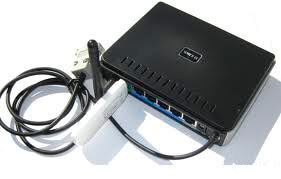
Since I bought the Huawei e173 modem (Similar to Huawei E1550) and there is a router dir-320, decided to lay out instructions on how to install Asterisk 1.6.2.22 and assemble chan_dongle and chan_datacard to work with the Huawei e173 installed on the router dir-320It can also work on any routers that support alternative firmware on the mipsel architecture, such as OpenWRT, DD-WRT, etc.
Due to the fact that Asterisk, which is installed from Oleg's repository, has been updated to the latest stable version 1.6.2.22 (great thanks to the miners) And all the binaries that were previously laid out by good people on the Internet to connect. Huawei modem to Asterisk in dir-320, on the new Asterisk did not work, as they were assembled on an older version, had to collect chan_dongle, and at the same time chan_datacard new Asterisk.
Instructions for firmware, as well as a link to the firmware with kernel modules is located at: Firmware router dir-320 firmware rtn-r3015M from Oleg with core 2.6.19, using the program TFTP
You must disable the e173 virtual cdrom via the program. minicom Debian Squeeze
Installation minicom carried out by the command:
aptitude install minicom
Запускаем программу:
minicom -s
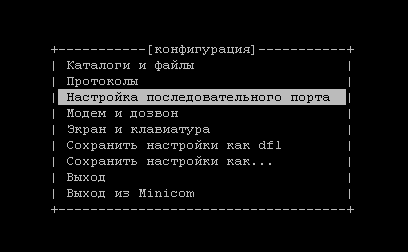
When you open the program, choose Sequential port configuration
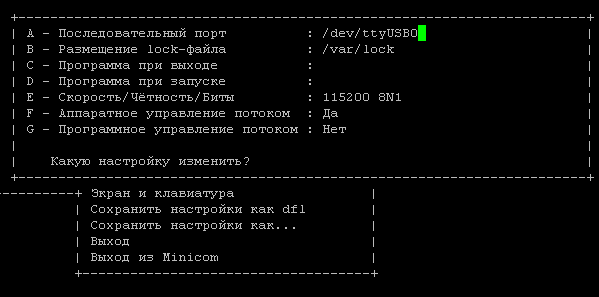
Need to change serial port capitalize Aah. (Shift a) and correcting the /dev/ttyUSB0 double-press ENTER
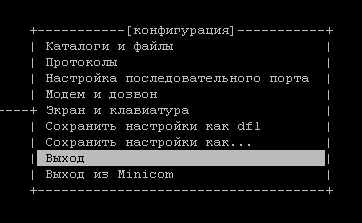
Next, press on. Exit
After that, enter the command to your modem terminal:
AT^U2DIAG=256
After that, you need to press. CTRL + apressed Shift + q And we're off the modem.
Turn it off, plug in the modem.
These are the main commands for modem:
Only GPRS/EDGE - AT^SYSCFG=13,1,3FFFFFFF,2,4
Only 3G/WCDMA - AT^SYSCFG=14,2,3FFFFFFF,2,4
Preferring GPRS/EDGE - AT^SYSCFG=2,1,3FFFFFFF,2,4
Prefer 3G/WCDMA - AT^SYSCFG=2,2,3FFFFFFF,2,4
Device in mode modem only - AT^U2DIAG=0
Device in modem + CD-ROM - AT^U2DIAG=1
Device in modem + CD-ROM + Card Reader - AT^U2DIAG=255 or AT^U2DIAG=276
Device in modem + Card Reader - AT^U2DIAG=256
Next, you need to flash the router with Oleg’s firmware with a 2.6 core, since Asterisk on the 2.4 core with a chan_dongle module and chan_datacard will not work.
Because of my laziness, I do not adjust everything with my hands, but use a script. (This script is designed for firmware from Oleg) installing all the main software on the modem flash drive, and then, what I do not use - delete.
After the router firmware, we change the user name from admin to root, go under the root user over telnet and execute commands:
wget http://rung.narod.ru/start
chmod +x start
./start
You can download the script from this site (but it is better to download it naturally from the official one, I have posted here just in case) it is relevant on 20.02.2012 by completing commands:
wget http://softnastroy.com/downloads/asterisk/install_all_progs_08.07.2012 -O start
chmod +x start
./start
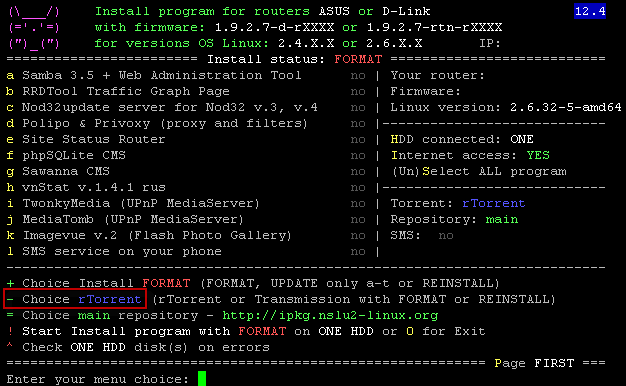
And here instead rtorrent install transmission: press - (dash) and press Enterafter rtorrent modified transmission Start the installation by introducing a command ! (exclamation point) and press Enter, We agree with the formatting of the flash drive by clicking y when it requests a script.

After installing all programs through a script that installs the main programs, you need to remove (if you do not use) unnecessary programs, in my case I do not need either a torrent swinger or php web server support, so I delete unnecessary programs by the command:
ipkg remove transmission eaccelerator php-fcgi
I also remove the scripts to launch these programs from the autoload that is on the way. /opt/etc/init.d/
Next, install on our router. Asterisk 1.6.2.22 team:
ipkg install asterisk16
Installation of Asterisk 1.6.2.22
Configure the loading of Asterisk modules
File in. /opt/etc/asterisk/modules.conf you need to insert this set of downloadable modules, it in the process will adjust to your needs:
[modules]
autoload=no
load => format_pcm.so
load => codec_ulaw.so
load => codec_alaw.so
load => app_dial.so
load => app_macro.so
load => app_playback.so
load => app_setcallerid.so
load => app_disa.so
load => app_transfer.so
load => func_timeout.so
load => func_callerid.so
load => func_logic.so
load => func_strings.so
load => pbx_config.so
load => pbx_spool.so
load => chan_sip.so
load => res_musiconhold.so
load => func_shell.so
load => func_channel.so
load => chan_dongle.so
load => chan_oss.so
To configure the Asterisk boot, you need to add to the file /tmp/local/sbin/post-mount
was:
#!/bin/sh
/opt/etc/init.d/rc.unslung start

rm /opt/var/run/*.pid
became:
#!/bin/sh
/opt/etc/init.d/rc.unslung start

/opt/sbin/asterisk

rm /opt/var/run/*.pid
After that, you need to record changes on the router’s flash drive by performing such a command:
flashfs save && flashfs commit && flashfs enable
Build chan_dongle and chan_datacard for the HUAWEI e173 modem
I put together two modules. chan_dongle and chan_datacard Just so that someone who needs, can download any ready-made module assembled without town garden with assembly.
! You only need to use one module.
Download chan_dongle.so Asterisk 1.6.2.22
Download the archive with the assembled module. Contents of the archive: chan_dongle.so, dongle.conf, extensions.conf
Download the assembled module chan_dongle.so from the console:
wget http://softnastroy.com/downloads/asterisk/chan_dongle.so
wget http://softnastroy.com/downloads/asterisk/chan_dongle_so.tgz
Download chan_datacard.so Asterisk 1.6.2.22
Download the archive with the assembled module. Archive content: chan_datacard.so, datacard.conf, extensions.conf
Download the assembled chan_datacard module from the console:
wget http://softnastroy.com/downloads/asterisk/chan_datacard.so
wget http://softnastroy.com/downloads/asterisk/chan_datacard-1.0.r310_so.tgz
Self-assembly from source materials:
For assembly. chan_dongle and chan_datacard It is necessary to establish the necessary tools and dependencies of the command:
ipkg install buildroot optware-devel make -force-overwrite
Added a parameter. -force-overwrite Because I didn’t have to install it. buildroot And I couldn't configure the package.
Create a folder in which we will download and in which we will configure and assemble the program:
mkdir -p /opt/usr/src/asterisk/
cd /opt/usr/src/asterisk/
Download, unpack and go to the folder with the source module chan_dongle:
cd /opt/usr/src/asterisk/
wget http://asterisk-chan-dongle.googlecode.com/files/chan_dongle-1.1.r10.tgz
tar xvfz chan_dongle-1.1.r10.tgz
cd chan_dongle-1.1.r10
Start configuration and assembly and installation of the module chan_dongle:
mkdir -p /opt/local/include
ln -s /opt/include/asterisk.h /opt/local/include/
./configure --target=mipsel-linux --build=mipsel-linux
make
cp chan_dongle.so /opt/lib/asterisk/modules/
cp etc/dongle.conf /opt/etc/asterisk/
Download, unpack and go to the folder with the source module chan_datacard:
cd /opt/usr/src/asterisk/
wget http://datacard.googlecode.com/files/chan_datacard-1.0.r310.tgz
tar xvfz chan_datacard-1.0.r310.tgz
cd chan_datacard-1.0.r310
Start configuration and assembly and installation of the module chan_datacard:
mkdir -p /opt/local/include
ln -s /opt/include/asterisk.h /opt/local/include/
./configure --target=mipsel-linux --build=mipsel-linux
make
cp chan_datacard.so /opt/lib/asterisk/modules/
cp etc/datacard.conf /opt/etc/asterisk/
Commando:
ls /dev/ttyUSB*
/dev/ttyUSB0  /dev/ttyUSB1  /dev/ttyUSB2
We see or don’t see a Linux router. DIR-320 modem HUAWEY E173.
File in. /etc/asterisk/dongle.conf You need to add settings for our modem.
was:
[dongle0]
audio=/dev/ttyUSB1              ; tty port for audio connection;        no default value
data=/dev/ttyUSB2               ; tty port for AT commands;             no default value

; or you can omit both audio and data together and use imei=123456789012345 and/or imsi=123456789012345
;  imei and imsi must contain exactly 15 digits !
;  imei/imsi discovery is available on Linux only
imei=123456789012345
imsi=123456789012345

; if audio and data set together with imei and/or imsi audio and data has precedence
;   you can use both imei and imsi together in this case exact match by imei and imsi required
became:
;[dongle0]
;audio=/dev/ttyUSB1             ; tty port for audio connection;        no default value
;data=/dev/ttyUSB2              ; tty port for AT commands;             no default value

; or you can omit both audio and data together and use imei=123456789012345 and/or imsi=123456789012345
;  imei and imsi must contain exactly 15 digits !
;  imei/imsi discovery is available on Linux only
;imei=123456789012345
;imsi=123456789012345

; if audio and data set together with imei and/or imsi audio and data has precedence
;   you can use both imei and imsi together in this case exact match by imei and imsi required


[dongle0]
audio=/dev/ttyUSB1 ; tty for audio connection
data=/dev/ttyUSB2 ; tty for AT commands
context=datacard-incoming ; context for incoming calls
group=1 ; calling group
rxgain=3 ; increase the incoming volume
txgain=3 ; increase the outgoint volume
resetdatacard=yes ; reset datacard during initialization
u2diag=256 ; set U2DIAG parameter (256 = modem+card_reader)
usecallingpres=yes ; use the caller ID presentation or not
callingpres=allowed_passed_screen ; set caller ID presentation
For the module chan_datacard difference chan_dongle configuration-file /etc/asterisk/datacard.conf only [dongle0] which should be changed [datacard0]
After installation, start the console with the command:
rasterisk
And we run two commands in the console:
module reload
dongle show devices
module reload - we overloaded the installed modules.
dongle show devices - This command, we see if the module can see our modem. Here's my takeaway from this team:
(none)*CLI> dongle show devices
ID           Group State      RSSI Mode Submode Provider Name  Model      Firmware          IMEI             IMSI             Number
dongle0      1     Free       21   3    3       life:)         E173       11.126.85.00.209  874965201353496  248063553293180  Unknown
Instructions for installing and configuring Asterisk, chan_dongle, chan_datacard in the dir-320 router with Oleg’s firmware (works on any firmware supporting optware) are completed. Now you just need to configure our VOIP server on Asterisk.
P.S. If on a new firmware when connecting a Huawei modem, it is not detected in the system, does not appear. /dev/ttyUSB* Add to the file /usr/local/sbin/post-mount:
vi /tmp/local/sbin/pre-mount
#!/bin/sh

swapon -a
kernel="$(uname -r)"
kernel=${kernel:0:3}

if [ "$kernel" = "2.4" ]; then
acm_mod="acm"
else
acm_mod="cdc-acm"
fi

usbserial="$(lsmod | grep usbserial)"
acm="$(lsmod | grep $acm_mod)"
option="$(lsmod | grep option)"

[ -z "$usbserial" ] && insmod usbserial;
[ -z "$acm" ] && insmod $acm_mod;
[ -z "$option" ] && insmod option;
Save all changes in non-volatile memory by executing the command:
P.S.
Me and my modem. Huawei e173 They did not live together, so they changed their lives. Huawei e1550. After installing the software on the flash drive, the flash drive itself per night was remounted independently 8-10 times. And each rewiring created a new mounting point. Why did all the software installed on the flash drive stop working? Modem bought it aukro and the seller of the modem agreed to exchange Huawei e1550 It's a difference, for which I thank you very much. With the new modem no problems, everything is determined and works faultlessly. Maybe the problem is in the modem itself or in the firmware, but I managed to exchange it and I am glad that I did not have to suffer with its firmware.

comment