

 Suppose we have 2 offices in different parts of the city, or in different cities or countries and each of them is connected to the Internet via a fairly good channel. We need to connect them into a single local area network. In this case, none of the users will guess where a particular computer or printer is on the local network, use printers, shared folders and all the advantages of a physical network. Remote employees connected via OpenVPN will also be able to work on the network, as if their computers are in the physical network of one of the offices.
Configuration will be in Debian Squeeze, but the instruction is fully applicable to any distribution based on Debian, and with minor changes in the commands for installing and configuring the bridge and OpenVPN will apply to any Linux or FreeBSD distribution.
Assume that a Debian or Ubuntu distribution is installed according to one of the following instructions: Instructions for Debian installation, Instructions for installation of Ubuntu
Install and configure a VPN network based on OpenVPN using the bridge tap0
Create a network bridge between the physical network eth1 and virtual interface tap0
Install the necessary programs by agreeing to the request of the package manager:
aptitude install bridge-utils openvpn
We configure the server network based on the fact that we have 2 network cards: eth0 - receives the Internet from the provider and through it, office 1 goes to the Internet, as well as a network eth1 - Included in the office local area network switch 1, it will be included in the interface bridge br0
Editing the configuration file /etc/network/interfaces:
vi /etc/network/interfaces
was:
auto lo
iface lo inet loopback

# internet provider
auto eth0
iface eth0 inet static
    address 192.168.50.2
    netmask 255.255.255.0
    gateway 192.168.50.1

# local network
auto eth0
iface eth0 inet static
    address 10.10.10.1
    netmask 255.255.255.0
became:
auto lo
iface lo inet loopback

# Прописываем мост, в него включаем VPN интерфейс tap0 и сетевую карту eth1
auto br0
iface br0 inet static
# Добавляем в мост tap0 интерфейс openvpn
bridge_ports eth1 tap0
        address 10.10.10.1
        netmask 255.255.255.0

# Internet
auto eth0
iface eth0 inet static
    address 192.168.50.2
    netmask 255.255.255.0
    gateway 192.168.50.1
Save the changes and reboot the network with the command:
/etc/init.d/networking restart
After that, when executing the ifconfig command, a bridge should appear. br0 with IP 10.10.10.1, eth0 c IP address 192.168.50.2 and interface eth1 No IP address, because he's in the bridge. br0
Set up OPENVPN:
Copy scripts to configure our openvpn server with the command:
cp -Rp /usr/share/doc/openvpn/examples/easy-rsa/2.0/ /etc/openvpn/easy-rsa
Modify the file. /etc/openvpn/easy-rsa/varsTo define global variables and to create smaller keys, enter data:
vi /etc/openvpn/easy-rsa/vars
was:
...
export KEY_COUNTRY="US"
export KEY_PROVINCE="CA"
export KEY_CITY="SanFrancisco"
export KEY_ORG="Fort-Funston"
export KEY_EMAIL="[email protected]"
became:
...
export KEY_COUNTRY="UA"
export KEY_PROVINCE="11"
export KEY_CITY="Kiev"
export KEY_ORG="NameFirm"
export KEY_EMAIL="[email protected]"
Go to the folder with scripts for creating certificates and keys by the team:
cd /etc/openvpn/easy-rsa/
Initialize PKI (Public Key Infrastructure) commands:
. ./vars
./clean-all
Attention! When executing a team ./clean-all All existing certificates and keys of both the server and clients will be deleted, so do not execute on a combat server, or perform pre-saving folder. /etc/openvpn/ In the archives by the team:
tar cf - /etc/openvpn/ | gzip -c -9 > /home/openvpn_backup.tgz
Generate the Certificate Authority (CA) certificate and key with the command:
./build-ca

Most of the parameters will be picked up from the vars file. Only the name parameter should be indicated explicitly:
Name []:vpn
You can fill all the fields as you need each time.
We generate Diffie-Hellman parameters by the team:
./build-dh

We generate a certificate and the server's secret key, we do not enter anything on the request for entering a password, and when asked Sign the certificate? [y/n]:introduce y pressed EnterAnd then I did the command.
./build-key-server server
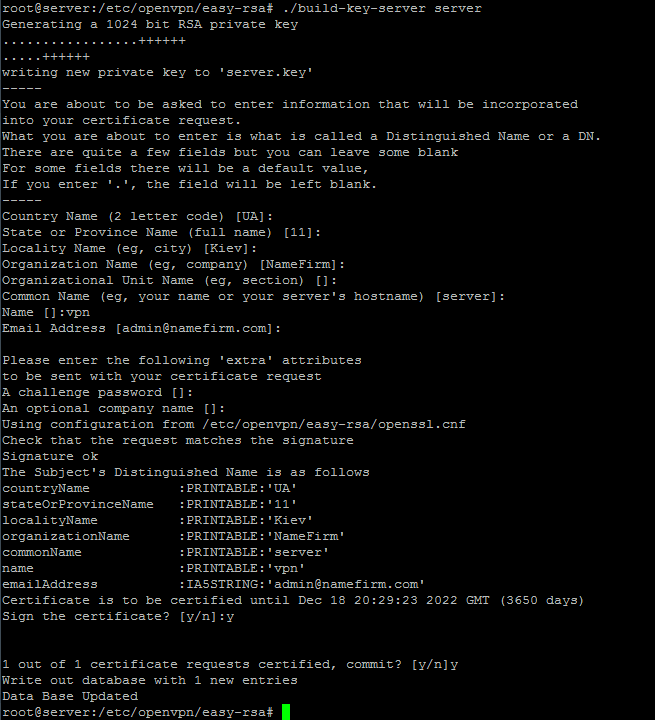
All parameters are accepted by default. On request. Common Name insert server
Common Name (eg, your name or your server's hostname) [ ]:server
Questions. Sign the certificate? and 1 out of 1 certificate requests certified, commit? We answer in the affirmative:
Sign the certificate? [y/n]:y 1 out of 1 certificate requests certified, commit? [y/n]y
It remains to create certificates and keys for customers. First, we initialize the parameters:
cd /etc/openvpn/easy-rsa/
. ./vars
Create keys for the user server1. For example, we add as many users as you need:

./build-key server1
./build-key client1
./build-key client2
Assuming that we have a network. 10.10.10.0/24 We immediately allocate a pool of addresses for office computers 1 - 10.10.10.40-149For office 2, allocate a pool of addresses 10.10.10.150-254 and allocate a pool of addresses for remote employees 10.10.10.21-39.
Create a folder. /etc/openvpn/ccd/ where we specify which client to which IP team:
mkdir -p /etc/openvpn/ccd/
We prescribe to each client your IP in the network commands:
echo "ifconfig-push 10.10.10.150 255.255.255.0" > /etc/openvpn/ccd/server1
echo "ifconfig-push 10.10.10.21 255.255.255.0" > /etc/openvpn/ccd/client1
echo "ifconfig-push 10.10.10.22 255.255.255.0" > /etc/openvpn/ccd/client2
We create a configuration file of the server:
vi /etc/openvpn/server.conf
##################################
port 1195
proto udp
dev tap0

ca easy-rsa/keys/ca.crt
cert easy-rsa/keys/server.crt
key easy-rsa/keys/server.key  # This file should be kept secret
dh easy-rsa/keys/dh1024.pem

mode server
tls-server
daemon
ifconfig 10.10.10.1 255.255.255.0

client-config-dir /etc/openvpn/ccd
keepalive 10 20
client-to-client
comp-lzo
persist-key
persist-tun
verb 3
log-append /var/log/openvpn.log

#script-security 2   # раскоментировать при работе на OpenVPN версии от 2.4

up /etc/openvpn/up.sh
#################################
Allow OpenVPN to run scripts:
vi /etc/default/openvpn
was:
OPTARGS=""
became:
OPTARGS="--script-security 2"
Creating a script. /etc/openvpn/up.sh Starting when OpenVPN server is launched:
vi /etc/openvpn/up.sh

#!/bin/sh
brctl addif br0 tap0
brctl addif br0 eth1
ifconfig tap0 0.0.0.0
We give the rights to execute scripts /etc/openvpn/up.sh team:
chmod +x /etc/openvpn/up.sh
After that, restart the OpenVPN server with the command:
/etc/init.d/openvpn restart
Executing the command. ifconfigThere should be an interface. tap0 No IP address.
Collect an archive with keys for distribution to remote employees and sending to the office 2
Create folders with usernames by commands:
mkdir -p /etc/openvpn/users/server1
mkdir -p /etc/openvpn/users/client1
mkdir -p /etc/openvpn/users/client2
Create a folder with archived keys by the command:
mkdir -p /etc/openvpn/users_tgz
Collect keys and certificates on user folders by commands:
cp /etc/openvpn/server/easy-rsa/keys/server1.key /etc/openvpn/users/server1/
cp /etc/openvpn/server/easy-rsa/keys/server1.crt /etc/openvpn/users/server1/
cp /etc/openvpn/server/easy-rsa/keys/ca.crt /etc/openvpn/users/server1/

cp /etc/openvpn/server/easy-rsa/keys/client1.key /etc/openvpn/users/client1/
cp /etc/openvpn/server/easy-rsa/keys/client1.crt /etc/openvpn/users/client1/
cp /etc/openvpn/server/easy-rsa/keys/ca.crt /etc/openvpn/users/client1/

cp /etc/openvpn/server/easy-rsa/keys/client2.key /etc/openvpn/users/client2/
cp /etc/openvpn/server/easy-rsa/keys/client2.crt /etc/openvpn/users/client2/
cp /etc/openvpn/server/easy-rsa/keys/ca.crt /etc/openvpn/users/client2/
We create configuration files based on the fact that server1 is a remote office server 2, and client1 and client2 These are remote employees connecting to a VPN network outside of Windows.
!!! Instead of IP-SERVER-VPN, set the external IP address of the OpenVPN server.
Create an OpenVPN configuration file for server1:
echo "
remote IP-SERVER-VPN 1195
client
dev tap0
proto udp
resolv-retry infinite
nobind
persist-key
persist-tun
ca ca.crt
cert server1.crt
key server1.key
comp-lzo
verb 4
mute 20
verb 3
log-append /var/log/openvpn.log
up /etc/openvpn/up.sh
" > /etc/openvpn/users/server1/server1.conf
Archiving keys for server1 team:
tar cf - /etc/openvpn/users/server1 | gzip -c -9 > /etc/openvpn/users_tgz/server1.tgz
Create a configuration file for client1:
echo "
remote IP-SERVER-VPN 1195
client
dev tap0
proto udp
resolv-retry infinite
nobind
persist-key
persist-tun
ca ca.crt
cert client1.crt
key client1.key
comp-lzo
verb 4
mute 20
verb 3
" > /etc/openvpn/users/client1/client1.ovpn
Archive keys for client1 team:
tar cf - /etc/openvpn/users/client1 | gzip -c -9 > /etc/openvpn/users_tgz/client1.tgz
Create a configuration file for client2 team:
echo "
remote IP-SERVER-VPN 1195
client
dev tap0
proto udp
resolv-retry infinite
nobind
persist-key
persist-tun
ca ca.crt
cert client2.crt
key client2.key
comp-lzo
verb 4
mute 20
verb 3
" > /etc/openvpn/users/client1/client2.ovpn
Archiving keys for client2 team:
tar cf - /etc/openvpn/users/client2 | gzip -c -9 > /etc/openvpn/users_tgz/client2.tgz
Configure a VPN server office 2
In the instructions above, we have installed and configured a VPN server to Debian GNU/Linux Using OpenVPN, they created certificate keys for remote office server 2 and remote employees. Now we need to connect office 1 with office 2 in a single local network through a VPN.
Suppose that in office 2 we have installed and configured a Linux server (gateway), which deals with the distribution of Internet channel for office employees2. There are 2 network cards on this server: eth0 - Internet Service Provider and eth1 - local area network, it will be included in the bridge, and will have a pool of addresses 10.10.10.100-254
We need to install the software by the team:
aptitude install bridge-utils openvpn
Configure the server network
We configure the network based on the fact that we have 2 network cards eth0 - receives the Internet from the provider and through it, office 1 goes to the Internet, as well as a network eth1 - Included in the office local area network switch 1, it will be included in the interface bridge br0
Editing the configuration file /etc/network/interfaces:
vi /etc/network/interfaces
was:
auto lo
iface lo inet loopback

# internet provider
auto eth0
iface eth0 inet static
    address 192.168.60.2
    netmask 255.255.255.0
    gateway 192.168.60.1

# local network
auto eth0
iface eth0 inet static
    address 192.168.1.1
    netmask 255.255.255.0
became:
auto lo
iface lo inet loopback

# Прописываем мост, в него включаем VPN интерфейс tap0 и сетевую карту eth1
auto br0
iface br0 inet static
# Добавляем в мост tap0 интерфейс openvpn
bridge_ports eth1 tap0
        address 10.10.10.150
        netmask 255.255.255.0

# Internet
auto eth0
iface eth0 inet static
    address 192.168.60.2
    netmask 255.255.255.0
    gateway 192.168.60.1
Save the changes and reboot the network with the command:
/etc/init.d/networking restart
Afterwards, when performing the command ifconfig There will be a bridge. br0 IP 10.10.10.150, eth0 c IP address 192.168.60.2 interface eth1 without an IP address because it is in the bridge. br0
For office computers 2, we issue IP addresses to computers without going beyond 10.10.10.150-254where 10.10.10.150 This is the IP address of the office server 2.
Flow from the office server VPN 1 the collected archive of OpenVPN keys to the office server 2 command:
ssh -P22 /etc/openvpn/users_tgz/server1.tgz root@IP-SERVER:/root/
Or, if the server1 of office 2 does not have a permanent or dynamic IP, we will drain the keys from the VPN server of office 2 by the command:
ssh -P22 root@IP-SERVER:/etc/openvpn/users_tgz/server1.tgz /root/
To request a password - enter the user password rootAfter entering the correct password, the archive with the keys is downloaded to the folder. /root/server1.tgz
Unpacking the contents of the archive (Only key files without folders) /root/server1.tgz folder /etc/openvpn/
Allow OpenVPN to run scripts:
vi /etc/default/openvpn
was:
...
OPTARGS=""
became:
...
OPTARGS="--script-security 2"
Creating a script. /etc/openvpn/up.sh Starting when a VPN client is connected to the VPN server:
vi /etc/openvpn/up.sh

#!/bin/sh
brctl addif br0 tap0
brctl addif br0 eth1
ifconfig tap0 0.0.0.0
chmod +x /etc/openvpn/up.sh
Reboot the OpenVPN server with the command:
/etc/init.d/openvpn restart
When executing a team ifconfig There should be an interface. tap0 No IP address.
Now you can ping from both offices computers of the other office, use shared folders, printers, resources of another office, as well as arrange game battles office 1 on office 2 :
To check the interfaces connected to the bridge, execute the command:
brctl show
System response:
bridge name     bridge id               STP enabled     interfaces
br0             7000.003ds4sDsf6       no              eth1
                                                       tap0
See our local network map eth1 OpenVPN Virtual Interface tap0
The task is completed, two remote offices are connected to one local network.
If you benefit from the article, share with your friends by clicking on the icon of your social network at the bottom of this article. Please comment on this instruction, did you like it? You can also subscribe to receive notifications about the release of new articles in your mail on the page. Subscription to SoftNastroy.COM
And now let’s take a short break and rest for half a minute, lifting the mood for more productive work, watch the video and smile:

comment