

 All actions on the router firmware, you do at your own risk. Once the router is firmware, you lose the manufacturer’s warranty. But later you can fill in the official firmware downloaded from the official D-link website.
The author of the instructions, that is, I do not accept any responsibility if YOU somehow kill your or someone else's router. But let me tell you right away that I have stitched my router many times already, and I had no problems with it.
The firmware fits the dir-320 router. The dir-320/NRU router will not work.
Let's get to the router firmware.
Download the TFTP program With the help of which we will sew our router, is located at the address http://softnastroy.com/downloads/dir320/tftp.exe
Download firmware for the dir320 router on disk C or D, located at the address http://softnastroy.com/downloads/dir320/WL500gpv2-1.9.2.7-rtn-r3015M.trx
If core modules are needed, it is possible to download Firmware with modules, located at the address http://softnastroy.com/downloads/dir320/WL500gpv2-1.9.2.7-rtn-r3015M.tar...
Open the TFTP program:
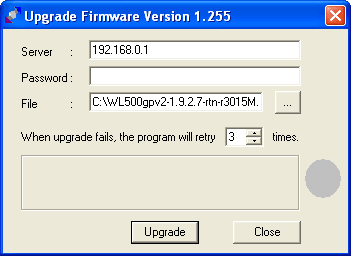
In the field. Server prescribe 192.168.0.1
Field. Password We leave it empty.
Right of the field. File press the three-dot button and select our firmware, which we saved to disk C.
In network settings, set yourself an IP address 192.168.1.5 and connect the dir320 LAN router (not WAN) to the computer’s network card with a network cable.
Further on the router DIR-320 has a recessed button reset settings, take a simple match or other object, and when the router is turned on, press and hold for 30 seconds without letting go of the match (the button pressed) pull out the plug with power and wait for 30 seconds, without releasing the button turn on the power and wait as the indicator on the front panel will start blinking - Immediately release the button and in the program TFTP press the button Upgrade.
If you managed and did everything correctly - should go pouring and installing firmware. At this time, you can not turn off the cable and power router for 5-10 minutes.
Go to the firmware through the browser at:
http://192.168.1.1/
login: admin
pass: admin
Firmware installed, task accomplished.
I was with you. Sergey Lazarenko

comment