

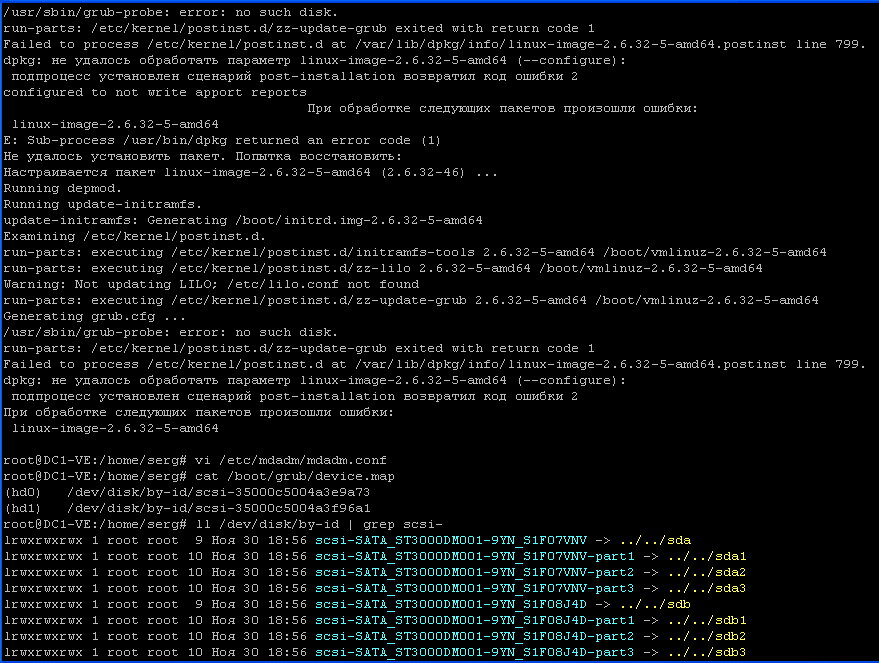
There is a server running on soft raid-1 with Debian Squeeze, during the update of the server packages received such errors:
- W: mdadm: /etc/mdadm/mdadm.conf defines no arrays.
- /usr/sbin/grub-probe: error: no such disk.
Detailed response from the system:
...
Failed to process /etc/kernel/postinst.d at /var/lib/dpkg/info/linux-image-2.6.3 2-5-amd64.postinst line 799.
dpkg: the linux-image-2.6.32-5-amd64 (--configure) parameter could not be processed:
subprocess installed post-installation script returned error code 2
configured to not write apport reports
Errors occurred in the processing of the following packages:
linux-image-2.6.32-5-amd64
E: Sub-process /usr/bin/dpkg returned an error code (1)
Failed to install the package. Attempt to restore:
Configures the package Linux-image-2.6.32-5-amd64 (2.6.32-46)
Running depmod.
Running update-initramfs.
update-initramfs: Generating /boot/initrd.img-2.6.32-5-amd64
W: mdadm: /etc/mdadm/mdadm.conf defines no arrays.
Examining /etc/kernel/postinst.d.
run-parts: executing /etc/kernel/postinst.d/initramfs-tools 2.6.32-5-amd64 /boot /vmlinuz-2.6.32-5-amd64
run-parts: executing /etc/kernel/postinst.d/zz-lilo 2.6.32-5-amd64 /boot/vmlinuz -2.6.32-5-amd64
Warning: Not updating LILO; /etc/lilo.conf not found
run-parts: executing /etc/kernel/postinst.d/zz-update-grub 2.6.32-5-amd64 /boot/ vmlinuz-2.6.32-5-amd64
Generating grub.cfg ...
/usr/sbin/grub-probe: error: no such disk.
run-parts: /etc/kernel/postinst.d/zz-update-grub exited with return code 1
Failed to process /etc/kernel/postinst.d at /var/lib/dpkg/info/linux-image-2.6.3 2-5-amd64.postinst line 799.
dpkg: the linux-image-2.6.32-5-amd64 (--configure) parameter could not be processed:
subprocess installed post-installation script returned error code 2
Errors occurred in the processing of the following packages:
linux-image-2.6.32-5-amd64
There are 2 errors that need to be corrected:
1. W: mdadm: /etc/mdadm/mdadm.conf defines no arrays.
2. /usr/sbin/grub-probe: error: no such disk.
Fix the first error: W: mdadm: /etc/mdadm/mdadm.conf defines no arrays.
Checking the file contents. /etc/mdadm/mdadm.conf, there must be specified the connected sections by the command:
cat /etc/mdadm/mdadm.conf
System response:
DEVICES /dev/[hs]d*
We see that there are no partitions in the configuration file, we check the contents of the connected partitions in general. mdadm team:
mdadm --detail --scan
System response:
ARRAY /dev/md/0 metadata=1.2 name=rescue:0 UUID=5d83f792:5e36f824:fcb2bb6c:28e7807b
ARRAY /dev/md/1 metadata=1.2 name=rescue:1 UUID=bfd9dd1d:7b471ce1:527fb81d:d4ea0227
We present the contents of the file. /etc/mdadm/mdadm.conf This is the view.
vi /etc/mdadm/mdadm.conf

DEVICE partitions
CREATE owner=root group=disk mode=0660 auto=yes
HOMEHOST <system>
MAILADDR root
# definitions of existing MD arrays
ARRAY /dev/md/0 metadata=1.2 UUID=5d83f792:5e36f824:fcb2bb6c:28e7807b
ARRAY /dev/md/1 metadata=1.2 UUID=bfd9dd1d:7b471ce1:527fb81d:d4ea0227
Correcting the second mistake: /usr/sbin/grub-probe: error: no such disk.
Checking the file contents. /boot/grub/device.map For the presence of sections by the team:
cat /boot/grub/device.map
System response:
(hd0)   /dev/disk/by-id/scsi-35000c5004a3e9a73
(hd1)   /dev/disk/by-id/scsi-35000c5004a3f96a1
Now we need to make sure that what is written in the file corresponds to reality, to do this, execute a command and compare the system’s response with what is in the file. /boot/grub/device.map After completing the command:
ll /dev/disk/by-id | grep scsi-
System response:
lrwxrwxrwx 1 root root  9 Ноя 30 18:56 scsi-SATA_ST3000DM001-9YN_S1F07VNV -> ../../sda
lrwxrwxrwx 1 root root 10 Ноя 30 18:56 scsi-SATA_ST3000DM001-9YN_S1F07VNV-part1 -> ../../sda1
lrwxrwxrwx 1 root root 10 Ноя 30 18:56 scsi-SATA_ST3000DM001-9YN_S1F07VNV-part2 -> ../../sda2
lrwxrwxrwx 1 root root 10 Ноя 30 18:56 scsi-SATA_ST3000DM001-9YN_S1F07VNV-part3 -> ../../sda3
lrwxrwxrwx 1 root root  9 Ноя 30 18:56 scsi-SATA_ST3000DM001-9YN_S1F08J4D -> ../../sdb
lrwxrwxrwx 1 root root 10 Ноя 30 18:56 scsi-SATA_ST3000DM001-9YN_S1F08J4D-part1 -> ../../sdb1
lrwxrwxrwx 1 root root 10 Ноя 30 18:56 scsi-SATA_ST3000DM001-9YN_S1F08J4D-part2 -> ../../sdb2
lrwxrwxrwx 1 root root 10 Ноя 30 18:56 scsi-SATA_ST3000DM001-9YN_S1F08J4D-part3 -> ../../sdb3
Naturally, scsi-35000c5004a3e9a73 fails scsi-SATA_ST3000DM001-9YN_S1F07VNVeh scsi-35000c5004a3f96a1 fallow scsi-SATA_ST3000DM001-9YN_S1F08J4D
Fix the file. /boot/grub/device.map:
vi /boot/grub/device.map
was:
(hd0)   /dev/disk/by-id/scsi-35000c5004a3e9a73
(hd1)   /dev/disk/by-id/scsi-35000c5004a3f96a1
became:
(hd0)   /dev/disk/by-id/scsi-SATA_ST3000DM001-9YN_S1F07VNV
(hd1)   /dev/disk/by-id/scsi-SATA_ST3000DM001-9YN_S1F08J4D
Save the modified file and update the downloader grub team:
update-grub
And after updating the grub, we finish updating the system with the command:
aptitude safe-upgrade
System response:
Следующие частично установленные пакеты будут настроены:
  linux-image-2.6.32-5-amd64
Ни одного пакета не будет установлено, обновлено или удалено.
0 пакетов обновлено, 0 установлено новых, 0 пакетов отмечено для удаления, и 0 пакетов не обновлено.
Необходимо получить 0 B архивов. После распаковки 0 B будет занято.
Настраивается пакет linux-image-2.6.32-5-amd64 (2.6.32-46) ...
Running depmod.
Running update-initramfs.
update-initramfs: Generating /boot/initrd.img-2.6.32-5-amd64
Examining /etc/kernel/postinst.d.
run-parts: executing /etc/kernel/postinst.d/initramfs-tools 2.6.32-5-amd64 /boot/vmlinuz-2.6.32-5-amd64
run-parts: executing /etc/kernel/postinst.d/zz-lilo 2.6.32-5-amd64 /boot/vmlinuz-2.6.32-5-amd64
Warning: Not updating LILO; /etc/lilo.conf not found
run-parts: executing /etc/kernel/postinst.d/zz-update-grub 2.6.32-5-amd64 /boot/vmlinuz-2.6.32-5-amd64
Generating grub.cfg ...
Found linux image: /boot/vmlinuz-2.6.32-5-amd64
Found initrd image: /boot/initrd.img-2.6.32-5-amd64
done
After updating the kernel, we overload our server with a command:
reboot
Errors corrected:
- W: mdadm: /etc/mdadm/mdadm.conf defines no arrays.
- /usr/sbin/grub-probe: error: no such disk.
Task completed, errors fixed, server updated.
I was with you. Sergey Lazarenko.
Watch a short video about truth and lies in relationships:

comment