

In this guide, we will combine 3 offices, each with its own subnetwork into a single local area network using the Linux Debian Wheezy operating system, OpenVPN software and Arno-Iptables-Firewall.
The OpenVPN server itself will be configured via the tun interface.
In each of the offices, we install Debian 7 Wheezy operating system on a server with 2 network cards according to the instructions. Debian Wheezy installation with detailed screenshotsConnecting the Internet Service Provider. Be sure to have an honest (white) static IP address on one of the office servers, since other office servers will be connected to it.
BUT!! It is possible to work through dynamic DNS using the service no-ip.com. Dynamic IP has been used by me with the DSL provider on this service for more than 4 years and performed well 24/7.
If an organization needs to connect remote employees to network services and save on the workplace, then connecting to OpenVPN will be one of the best, simple and secure solutions. Remote employees will also be able to work on the network, as if their computers are in a network of offices.
Network cards on all servers:
- eth0 - Local area network
- eth1 - Internet provider
You can configure the network and Internet on each server according to the instructions: Set up an Internet connection, as well as configuring network cards on the server in Debian, Ubuntu and their derivatives
For an internal VPN network, allocate yourself a subnet:
- VPN: 192.168.255.0/24
Network addressing of local networks by office, each server has its own associated IP in the VPN subnet:
Office1:
- External IP: 95.243.2.27
- Local area network: 192.168.10.0/24
- IP VPN: 192.168.255.1
Office 2:
- Local area network: 192.168.20.0/24
- IP VPN: 192.168.255.5
Office 3:
- Local area network: 192.168.30.0/24
- IP VPN: 192.168.255.9
For servers, you can choose another IP from the table below, if you connect remote employees, from the same table we select their IP:
| 1,2 | 5,6 | 9,10 | 13,14 | 17,18 | 21,22 | 25,26 | 29,30 | 33,34 | 37,38 | 41,42 |
| 45,46 | 49,50 | 53,54 | 57,58 | 61,62 | 65,66 | 69,70 | 73,74 | 77,78 | 81,82 | 85,86 |
| 89,90 | 93,94 | 97,98 | 101,102 | 105,106 | 109,110 | 113,114 | 117,118 | 121,122 | 125,126 | 129,130 |
| 133,134 | 137,138 | 141,142 | 145,146 | 149,150 | 153,154 | 157,158 | 161,162 | 165,166 | 169,170 | 173,174 |
| 177,178 | 181,182 | 185,186 | 189,190 | 193,194 | 197,198 | 201,202 | 205,206 | 209,210 | 213,214 | 217,218 |
| 221,222 | 225,226 | 229,230 | 233,234 | 237,238 | 241,242 | 245,246 | 249,250 | 253,254 | ||
Start installing and configuring the OpenVPN server.
On each server, install OpenVPN server by following the command:
aptitude install openvpn
Copy scripts to form keys and certificates by following the command:
cp -Rp /usr/share/doc/openvpn/examples/easy-rsa/2.0/ /etc/openvpn/vpn-tun
We will edit the basic parameters in the vars file so that we do not specify each time we create users:
vi /etc/openvpn/vpn-tun/vars
export KEY_COUNTRY="UA"
export KEY_PROVINCE="11"
export KEY_CITY="Kiev"
export KEY_ORG="Firmname"
export KEY_EMAIL="[email protected]"
Go to the copied folder:
cd /etc/openvpn/vpn-tun/
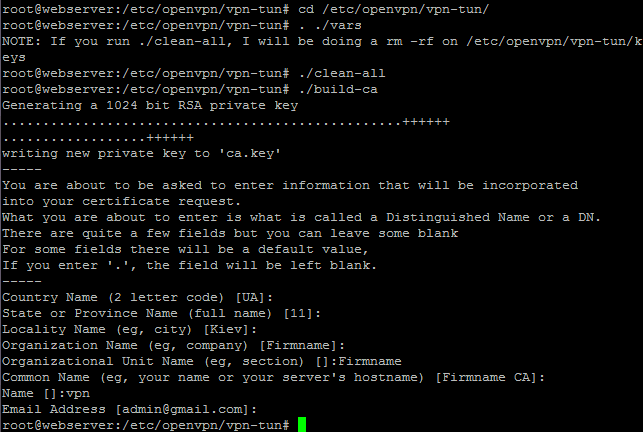
Initialize PKI (Public Key Infrastructure) by executing the following instructions:
. ./vars
./clean-all
Generate a Certificate Authority (CA) certificate and key by executing the command:
./build-ca
Most of the parameters will be picked up from the vars file. Only the Organizational Unit Name and Name settings must be explicitly stated:
Organizational Unit Name (eg, section) []:Firmname
Name []:vpn
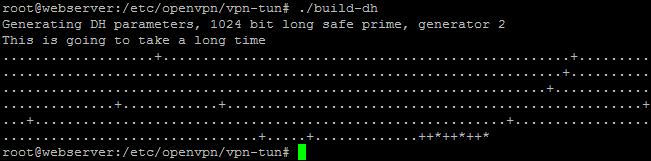
We generate Diffie-Hellman parameters by following the command:
./build-dh
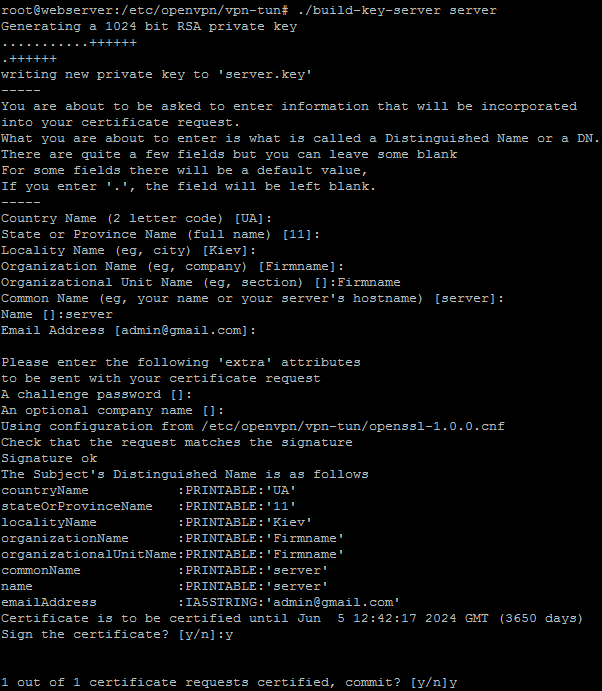
Generate the certificate and private key of the server by executing the command:
./build-key-server server
All parameters are accepted by default. Most of the parameters will be picked up from the vars file. Only the name parameter must be clearly indicated:
Name []: server
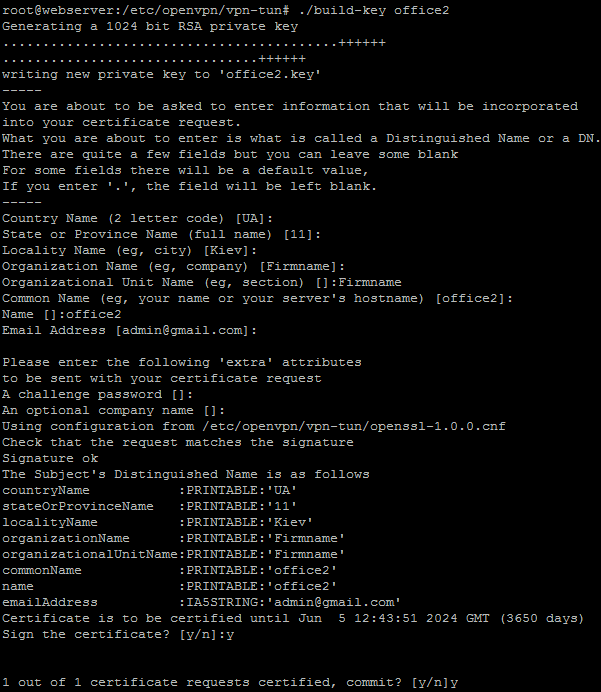
Add keys for our two offices that will connect to the OpenVPN server:
./build-key office2
./build-key office3
All parameters are accepted by default. For the Name request, enter the office names: office1, office2.

If after a while you need to add another office or several remote employees, you must execute the command:
. ./vars
After that, the team ./build-key user1 Add the required number of customers OpenVPN For servers, don’t forget to create a ccd file for the new VPN client.
Create the ccd folder by executing the command:
mkdir -p /etc/openvpn/vpn-tun/ccd/
Create a ccd file for each office in which we prescribe a permanent IP (Select IP from the IP table in the article above) and routes:
Create a ccd file for office 2 by executing the command:
echo '
#disable
ifconfig-push 192.168.255.5 192.168.255.6
iroute 192.168.20.0 255.255.255.0
push "route 192.168.10.0 255.255.255.0"
push "route 192.168.30.0 255.255.255.0"
' > /etc/openvpn/vpn-tun/ccd/office2
Create a ccd file for office 3 by executing the command:
echo '
#disable
ifconfig-push 192.168.255.9 192.168.255.10
iroute 192.168.30.0 255.255.255.0
push "route 192.168.10.0 255.255.255.0"
push "route 192.168.20.0 255.255.255.0"
' > /etc/openvpn/vpn-tun/ccd/office3
!!! If any of the customers will need to disable, just decomment parameter disable stripping off #
Create an OpenVPN server configuration file by executing the command:
echo '
dev tun
port 1194
proto udp
tls-server

server 192.168.255.0 255.255.255.0
ifconfig 192.168.255.1 192.168.255.2

route 192.168.20.0 255.255.255.0 # Подсеть Office2
route 192.168.30.0 255.255.255.0 # Подсеть Office3

ca /etc/openvpn/vpn-tun/keys/ca.crt
cert /etc/openvpn/vpn-tun/keys/server.crt
key /etc/openvpn/vpn-tun/keys/server.key
dh /etc/openvpn/vpn-tun/keys/dh1024.pem

client-to-client
client-config-dir /etc/openvpn/vpn-tun/ccd
comp-lzo
persist-tun
persist-key
verb 3
keepalive 10 60
ifconfig-pool-persist ipp.txt # Тут будут храниться ip адреса клиентов

log-append /var/log/openvpn_tun.log
status /var/log/openvpn_status_tun.log
' > /etc/openvpn/server-tun.conf
Create a folder where we copy the keys and config for customers by executing commands:
mkdir -p /etc/openvpn/users/office2
mkdir -p /etc/openvpn/users/office3
Create a configuration file for the office2 by pre-change ip_openvpn_server to an external IP server office1 or domain name:
echo '
remote ip_openvpn_server 1194
client
dev tun
proto udp
resolv-retry infinite
nobind
persist-key
persist-tun
ca ca.crt
cert office2.crt
key office2.key
comp-lzo
verb 4
mute 20
verb 3
#redirect-gateway
log-append /var/log/openvpn_office2_to_office1.log
' > /etc/openvpn/users/office2/office2_to_office1.conf
Create a configuration file for the office2 by pre-change ip_openvpn_server to an external IP server office1 or domain name:
echo '
remote ip_openvpn_server 1194
client
dev tun
proto udp
resolv-retry infinite
nobind
persist-key
persist-tun
ca ca.crt
cert office3.crt
key office3.key
comp-lzo
verb 4
mute 20
verb 3
#redirect-gateway
log-append /var/log/openvpn_office3_to_office1.log
' > /etc/openvpn/users/office3/office3_to_office1.conf
!!!! If it is necessary that the entire network of office 2 or office 3, or later connected remote employee passes through the VPN of the main server (office 1), for example, to hide your external IP you need to decomment the parameter. redirect-gatewayscavenging #. After decommentation, it will be necessary to allow NATfor IP VPN of the desired client on the office server, namely the NAT_INTERNAL_NET=" parameter in the file /etc/arno-iptables-firewall/conf.d/00debconf.conf. If you need to add several IPs, they are separated by a comma.
.
Copy certificates and key for office 1 and office 2:
cp /etc/openvpn/vpn-tun/keys/office2.key /etc/openvpn/users/office2/
cp /etc/openvpn/vpn-tun/keys/office2.crt /etc/openvpn/users/office2/
cp /etc/openvpn/vpn-tun/keys/ca.crt /etc/openvpn/users/office2/

cp /etc/openvpn/vpn-tun/keys/office3.key /etc/openvpn/users/office3/
cp /etc/openvpn/vpn-tun/keys/office3.crt /etc/openvpn/users/office3/
cp /etc/openvpn/vpn-tun/keys/ca.crt /etc/openvpn/users/office3/
Archive a folder with keys for each office:
cd /etc/openvpn/users/
tar cf - office2/ | gzip -c -9 > office2.tgz
tar cf - office3/ | gzip -c -9 > office3.tgz
Drop the archive with keys on the servers of offices:
Copy to the servers of office2 and office3 in the presence of an external IP command:
scp -P22 /etc/openvpn/users/office2.tgz root@ip_office2:/etc/openvpn/
scp -P22 /etc/openvpn/users/office3.tgz root@ip_office3:/etc/openvpn/
If there is no external IP, then copy from the office server2 and office3 with the command:
scp -P22 root@ip_office1:/etc/openvpn/users/office2.tgz /etc/openvpn/
scp -P22 root@ip_office1:/etc/openvpn/users/office3.tgz /etc/openvpn/
On the server of office 2, we unpack the archive by executing commands:
cd /etc/openvpn/
tar xvf office2.tgz
mv office2/* .
rmdir office2/
On the server of office 2, we unpack the archive by executing commands:
cd /etc/openvpn/
tar xvf office3.tgz
mv office3/* .
rmdir office3/
After that, we overload the OpenVPN server on each server and after a minute try to ping ip 192.168.255.1, 192.168.255.5 and 192.168.255.9 - IP servers. OpenVPN server reboot command:
/etc/init.d/openvpn restart
Install and configure Arno-Iptables-Firewall
Now we need to configure the firewall so that we can have access to local networks.
Install the Arno-Iptables-Firewall firewall by executing:
aptitude install arno-iptables-firewall
We answer the installer questions and configure Arno-Iptables-Firewall according to Installation and configuration instructions for Arno-Iptables-Firewall:
Configure the Office1 firewall:
In this case, we open ports on tcp 22 port and udp 1194 port:
vi /etc/arno-iptables-firewall/conf.d/00debconf.conf
EXT_IF="eth1"
EXT_IF_DHCP_IP=1
OPEN_TCP="22"
OPEN_UDP="1194"
INT_IF="eth0 tun+"
NAT=1
INTERNAL_NET="192.168.10.0/24 192.168.20.0/24 192.168.30.0/24 192.168.255.0/24"
NAT_INTERNAL_NET=""
OPEN_ICMP=1

В файл /etc/arno-iptables-firewall/custom-rules вносим код:
# openvpn Server
iptables -I FORWARD -i eth0 -o tun0 -j ACCEPT
iptables -I FORWARD -i tun0 -o eth0 -j ACCEPT
iptables -I INPUT -i tun0 -p tcp --dport 121 -j ACCEPT
iptables -I INPUT -i tun0 -p tcp --dport 21 -j ACCEPT
iptables -I INPUT -i tun0 -p tcp --dport 80 -j ACCEPT
iptables -I INPUT -i tun0 -p tcp --dport 53 -j ACCEPT
iptables -I INPUT -i tun0 -p udp --dport 53 -j ACCEPT
iptables -I INPUT -i tun0 -p udp --dport 69 -j ACCEPT
iptables -I INPUT -i tun0 -p tcp --dport 443 -j ACCEPT
iptables -I INPUT -i tun0 -p tcp --dport 139 -j ACCEPT
iptables -I INPUT -i tun0 -p tcp --dport 445 -j ACCEPT
iptables -I INPUT -i tun0 -p udp --dport 137 -j ACCEPT
iptables -I INPUT -i tun0 -p udp --dport 138 -j ACCEPT
iptables -I INPUT -i tun0 -p tcp --dport 901 -j ACCEPT
iptables -I INPUT -i tun0 -p tcp --dport 9100 -j ACCEPT
iptables -I INPUT -i tun0 -p ICMP --icmp-type 8 -j ACCEPT
iptables -I INPUT -i tun0 -p ICMP --icmp-type 11 -j ACCEPT

iptables -t nat -A POSTROUTING -s 192.168.10.0/24 -o tun0 -j MASQUERADE
Configure the Office2 firewall:
In this case, we open ports on tcp 22 port and udp 1194 port:
vi /etc/arno-iptables-firewall/conf.d/00debconf.conf
EXT_IF="eth1"
EXT_IF_DHCP_IP=1
OPEN_TCP="22"
OPEN_UDP=""
INT_IF="eth0 tun+"
NAT=1
INTERNAL_NET="192.168.10.0/24 192.168.20.0/24 192.168.30.0/24 192.168.255.0/24"
NAT_INTERNAL_NET=""
OPEN_ICMP=1

В файл /etc/arno-iptables-firewall/custom-rules вносим код:
# openvpn Server
iptables -I FORWARD -i eth0 -o tun0 -j ACCEPT
iptables -I FORWARD -i tun0 -o eth0 -j ACCEPT
iptables -I INPUT -i tun0 -p tcp --dport 121 -j ACCEPT
iptables -I INPUT -i tun0 -p tcp --dport 21 -j ACCEPT
iptables -I INPUT -i tun0 -p tcp --dport 80 -j ACCEPT
iptables -I INPUT -i tun0 -p tcp --dport 53 -j ACCEPT
iptables -I INPUT -i tun0 -p udp --dport 53 -j ACCEPT
iptables -I INPUT -i tun0 -p udp --dport 69 -j ACCEPT
iptables -I INPUT -i tun0 -p tcp --dport 443 -j ACCEPT
iptables -I INPUT -i tun0 -p tcp --dport 139 -j ACCEPT
iptables -I INPUT -i tun0 -p tcp --dport 445 -j ACCEPT
iptables -I INPUT -i tun0 -p udp --dport 137 -j ACCEPT
iptables -I INPUT -i tun0 -p udp --dport 138 -j ACCEPT
iptables -I INPUT -i tun0 -p tcp --dport 901 -j ACCEPT
iptables -I INPUT -i tun0 -p tcp --dport 9100 -j ACCEPT
iptables -I INPUT -i tun0 -p ICMP --icmp-type 8 -j ACCEPT
iptables -I INPUT -i tun0 -p ICMP --icmp-type 11 -j ACCEPT

iptables -t nat -A POSTROUTING -s 192.168.20.0/24 -o tun0 -j MASQUERADE
Configure the Office3 firewall:
In this case, we open the ports on tcp 22 port:
vi /etc/arno-iptables-firewall/conf.d/00debconf.conf
EXT_IF="eth1"
EXT_IF_DHCP_IP=1
OPEN_TCP="22"
OPEN_UDP=""
INT_IF="eth0 tun+"
NAT=1
INTERNAL_NET="192.168.10.0/24 192.168.20.0/24 192.168.30.0/24 192.168.255.0/24"
NAT_INTERNAL_NET=""
OPEN_ICMP=1

В файл /etc/arno-iptables-firewall/custom-rules вносим код:
# openvpn Server
iptables -I FORWARD -i eth0 -o tun0 -j ACCEPT
iptables -I FORWARD -i tun0 -o eth0 -j ACCEPT
iptables -I INPUT -i tun0 -p tcp --dport 121 -j ACCEPT
iptables -I INPUT -i tun0 -p tcp --dport 21 -j ACCEPT
iptables -I INPUT -i tun0 -p tcp --dport 80 -j ACCEPT
iptables -I INPUT -i tun0 -p tcp --dport 53 -j ACCEPT
iptables -I INPUT -i tun0 -p udp --dport 53 -j ACCEPT
iptables -I INPUT -i tun0 -p udp --dport 69 -j ACCEPT
iptables -I INPUT -i tun0 -p tcp --dport 443 -j ACCEPT
iptables -I INPUT -i tun0 -p tcp --dport 139 -j ACCEPT
iptables -I INPUT -i tun0 -p tcp --dport 445 -j ACCEPT
iptables -I INPUT -i tun0 -p udp --dport 137 -j ACCEPT
iptables -I INPUT -i tun0 -p udp --dport 138 -j ACCEPT
iptables -I INPUT -i tun0 -p tcp --dport 901 -j ACCEPT
iptables -I INPUT -i tun0 -p tcp --dport 9100 -j ACCEPT
iptables -I INPUT -i tun0 -p ICMP --icmp-type 8 -j ACCEPT
iptables -I INPUT -i tun0 -p ICMP --icmp-type 11 -j ACCEPT

iptables -t nat -A POSTROUTING -s 192.168.30.0/24 -o tun0 -j MASQUERADE
!!! In order for all computers behind OpenVPN servers to ping the computers of another office, they must have a gateway to their own server.
After all the work done, you can ping computers from another office.
This guide to connecting local area networks of different offices has been completed.
I was with you. Sergey Lazarenko.
Let’s take a short break in work and watch a video about how to light the fire of Nodya, this knowledge is not worn behind your shoulders, maybe when it comes to handy:

comment