

Detailed instructions for setting up the Asterisk server for the office. After setting up, you will receive the basic functionality of the telephone PBX.
1. We will create 5 numbers to which you can connect both a softphone (for example, 3CXPhone and MicroSIP) and an iron radio sip phone (for example, GIGASET C610A IP, Cisco 7492).
2. We will connect a direct Moscow number from the provider of IP telephony Zadarma, set up call reception from a direct number to our internal phone numbers.
3. Set up calls from / to the internal numbers of Zadarma telephony provider that are not charged.
4. Set up calls to external numbers through the Zadarma telephony provider.
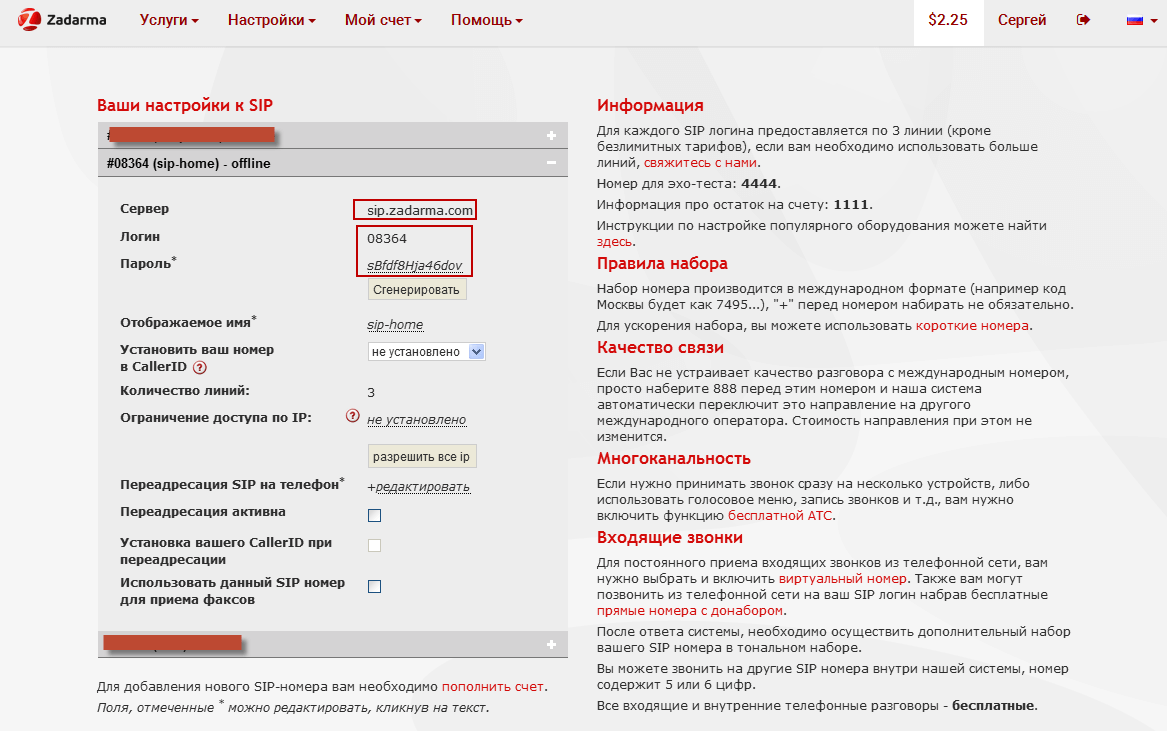
Register on the site zadarma.com, register a direct number in the desired country (you will need to attach a scan of the passpotra), in the sip settings write the login password and server:
login: 08364
pass: sBfdf8Hja46dov
server: sip.zadarma.com
If you need to train, then you can not connect a direct number, and do an internal provider to check the current configuration of telephony in operation. To simulate a call to a direct number, you connect from your smartphone to a free one of the sips, standard 3 sip numbers are given per account and call an internal sip number connected to Asterisk.
Background data:
Installed Asterisk 13 according to instructions Install Asterisk PBX 13 in Debian and Ubuntu serveror according to another of the many instructions for installing Asterisk on this site.
Once the server is installed, we have standard Asterisk server configuration files that are along the way. /etc/asterisk/
We go to this folder by following the command:
cd /etc/asterisk/
We create the necessary configuration files by executing the commands:
echo '
[general]
context=default
alwaysauthreject=yes
allowguest=no
match_auth_username=yes
allowoverlap=no
allowtransfer=yes

bindport=5060       ; управляющий SIP порт 5060 по умолчанию
bindaddr=0.0.0.0
tcpenable=yes
udpbindaddr=0.0.0.0
tcpbindaddr=0.0.0.0

;bindport=5171                ; управляющий SIP порт 5171 не стандартный, ставим при работе через интернет, чтобы отсечь основную массу ботов
;bindaddr=0.0.0.0:5171        ; расскоментировать этот блок и закоментировать блок выше со стандартным портом 5060
;tcpenable=yes
;udpbindaddr=0.0.0.0:5171
;tcpbindaddr=0.0.0.0:5171

videosupport=yes
useragent=csipsimple
pedantic=no
limitonpeers = yes

callcounter=yes

; раскоментировать и изменить на свои айпи сервера при подключении через NAT роутера,
; и обязательно пробросить на этот сервер rtp и sip порты на файрволе роутера(сервера):
;localnet=192.168.1.0/255.255.255.0
;externip=36.49.23.69

disallow=all
allow=alaw
allow=ulaw

language=ru
relaxdtmf=yes
dtmfmode=rfc2833
force_rport=yes

#include peers_registered.conf
#include peers_templates.conf
#include peers_userall.conf
#include peers_trunks.conf
' > sip.conf
Create a file with user templates:
echo '
[standard-user](!)
type=friend
qualify=600
force_rport=yes
host=dynamic
context=standard-user
callcounter=yes
canreinvite=no
call-limit=2
busylevel=2
Deny=0.0.0.0/0.0.0.0
Permit=192.168.1.0/255.255.255.0  ; Доступ только из локальной сети
Permit=10.100.10.0/255.255.255.0  ; Доступ только из VPN сети при наличии VPN

[softphone-user](!)
type=friend
qualify=yes
force_rport=yes
host=dynamic
context=standard-user
canreinvite=no
call-limit=1
busylevel=2
Deny=0.0.0.0/0.0.0.0
Permit=192.168.1.0/255.255.255.0   ; Доступ только из локальной сети
Permit=10.100.10.0/255.255.255.0  ; Доступ только из VPN сети при наличии VPN

[cisco-phone](!)
type=friend
qualify=600
transport=tcp
host=dynamic
context=standard-user
canreinvite=no
force_rport=yes
call-limit=1
busylevel=2
Deny=0.0.0.0/0.0.0.0
Permit=192.168.1.0/255.255.255.0   ; Доступ только из локальной сети
Permit=10.100.10.0/255.255.255.0  ; Доступ только из VPN сети при наличии VPN

[inet-user](!)
type=friend
qualify=yes
force_rport=yes
host=dynamic
context=standard-user
canreinvite=no
call-limit=2
busylevel=2
nat=yes
transport=tcp
; Доступ из любой сети, включая интернет
' > peers_templates.conf
Create internal phone numbers:
echo '
[101](standard-user)
secret=ch72passwd
callerid="Секретарь" <101>

[102](standard-user)
secret=cbTwpasswd
callerid="Менеджер продаж 1" <102>

[103](standard-user)
secret=dhBspasswd
callerid="Менеджер продаж 2" <103>

[104](cisco-phone)
secret=Bg3Bpasswd
callerid="Директор" <104>

[105](inet-user)
secret=Bg3Bpasswd
callerid="Директор IOS" <105>
' > peers_userall.conf
Create a peers_registered.conf file in which we configure sip registration with the provider:
echo '
; Zadarma
register => 08364:[email protected]/08364
' > peers_registered.conf
Create a peers_trunks.conf configuration file that will set the connection settings of an external telephony provider:
echo '
[Zadarma-08364]
type=friend
username=08364
secret=sBfdf8Hja46dov
fromuser=08364
fromdomain=sip.zadarma.com
host=sip.zadarma.com
force_rport=yes
insecure=invite
context=incoming
canreinvite=no
qualify=600
allow=alaw
call-limit=3
' > peers_trunks.conf
Create an extensions.conf file in which we connect the diaplan:
echo '
[general]
static=yes
writeprotect=no

[globals]
TRANSFER_CONTEXT=office-network
FORWARD_CONTEXT=office-network

[default]
exten => _X.,1,Hangup(21)
exten => i,1,Hangup(18)
exten => t,1,Hangup(19)

#include dialplan.conf
' > extensions.conf
echo '
[standard-user]
include => office-network
include => pstn-out

[office-network]
exten => _1XX,1,Dial(SIP/${EXTEN},120,KTt)
  same => n,Hangup()

[incoming]
;;; Provider
exten => 08364,1,Dial(SIP/101&SIP/102&SIP/103&SIP/104&SIP/105,120,KTt)
  same => n,Hangup(${HANGUPCAUSE})


[pstn-out]
; Звонки через провайдера

exten => _XXXX,1,Dial(SIP/Zadarma-08364/${EXTEN},120,KT)
   same => n,Hangup(${HANGUPCAUSE})
exten => _XXXXX,1,Dial(SIP/Zadarma-08364/${EXTEN},120,KT)
   same => n,Hangup(${HANGUPCAUSE})


;;; 9X  через 9 звоним на любые номера которые начинаются на 0, что актуально для Украины при звонках внутри страны
exten => _90X.,1,Dial(SIP/Zadarma-08364/${EXTEN:1},120,KT)
   same => n,Hangup(${HANGUPCAUSE})

;;;;;;;;;;;;;;;;;;;;;;;;;;;;;;;;;;;;;;;;;;;;;;;;;;;;;;;;;;;;;;;;;;;;;
;;; Скорая, Милиция и служба спасения
exten => _XXX,1,Dial(SIP/Zadarma-08364/${EXTEN},120,KT)
         same => n,Hangup(${HANGUPCAUSE})


[service-ivr]
exten => _1XX,1,ExecIf($[${DIALSTATUS} = CHANUNAVAIL]?Playback(ss-noservice,noanswer):Goto(11))
  same => n,Hangup(19)
  same => n,ExecIf($[${DIALSTATUS} = BUSY]?Hangup(18):Goto(21))
  same => n,ExecIf($[${DIALSTATUS} = NOANSWER]?Playback(ne-otvechaet,noanswer))
  same => n,Hangup(19)

[filter-invalid-numbers]
exten => _X,1,NoCDR
  same => n,Playback(incorect-number,noanswer)
  same => n,Hangup(28)
exten => _XX,1,NoCDR
  same => n,Playback(incorect-number,noanswer)
  same => n,Hangup(28)
' > dialplan.conf
We're setting up call translations:
vi features.conf
was:
[featuremap]
;blindxfer => #1
...
;atxfer => *2
became:
[featuremap]
blindxfer => **
...
atxfer => #
Thus, in the event of inclusion atxfer #When you call the secretary when you press your phone. #Redirection will be included, the secretary enters a number where he transfers the call and hangs up, the person will wait for the phone to be picked up on the transferred number. You can not lay down the phone, but wait for the phone to be raised on the transferred number, say who is calling and hanging up the phone, they will connect if the person who picked up the phone refuses to talk and hangs up the phone, the caller will be again connected to the secretary.
Since I don't have Dahdi equipment, Asterisk is scolding the error:
[Nov 23 10:44:35] ERROR[1266]: codec_dahdi.c:820 find_transcoders: Failed to open /dev/dahdi/transcode: No such file or directory
Execute the command to disable Dahdi:
echo 'noload => codec_dahdi.so' >> /etc/asterisk/modules.conf
Turn it on. verbose when entering the console through the command rasterisk (to see calls in the console, you can change the detail by changing the parameter from 3 to above):
sed -i 's/;verbose = 3/verbose = 3/g' /etc/asterisk/asterisk.conf
If a mistake pops up:
[Nov 23 11:10:14] ERROR[1680]: ari/config.c:312 process_config: No configured users for ARI
Disable ARI support in the file ari.conf execute the command:
sed -i 's/enabled = yes/enabled = no/g' /etc/asterisk/ari.conf
was:
enabled = yes
became:
enabled = no
Reboot the Asterisk server:
/etc/init.d/asterisk restart
[ ok ] Restarting asterisk (via systemctl): asterisk.service.
Going to the Asterisk Console rasterisk or asterisk -vvv Let's do the command.
sip show peers
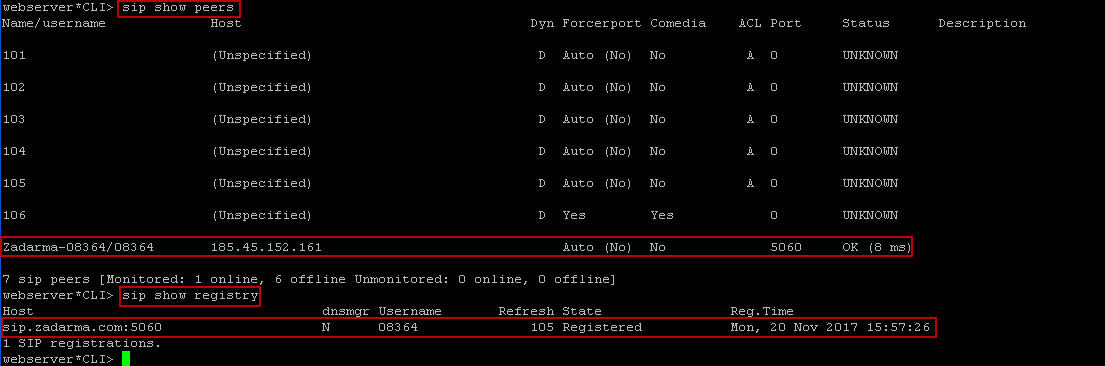
Here is a list of existing phones and registered peers (we have Zadarma provider):
Name/username             Host                                    Dyn Forcerport Comedia    ACL Port     Status      Description
101                       (Unspecified)                            D  Auto (No)  No          A  0        UNKNOWN
102                       (Unspecified)                            D  Auto (No)  No          A  0        UNKNOWN
103                       (Unspecified)                            D  Auto (No)  No          A  0        UNKNOWN
104                       (Unspecified)                            D  Auto (No)  No          A  0        UNKNOWN
105                       (Unspecified)                            D  Yes        Yes            0        UNKNOWN
Zadarma-08364/08364       185.45.152.161                              Auto (No)  No             5060     OK (8 ms)
By executing the command:
sip show registry
The list and status of registered peers from the provider, in our case only one Zadarma:
Host                                    dnsmgr Username       Refresh State                Reg.Time
sip.zadarma.com:5060                    N      08364              105 Registered           Thu, 23 Nov 2017 10:59:24
1 SIP registrations.
In our case, we see the status OK and Registered
[Nov 23 10:44:35] ERROR[1266]: codec_dahdi.c:820 find_transcoders: Failed to open /dev/dahdi/transcode: No such file or directory
The provider is connected, it remains to connect the phones of fellows and you can receive and make calls.
For example, connect one softphone to 101 numbers and the second softphone to 102 numbers, on a smartphone I will connect an additional sip account to check the call from the outside to the phone and from telephony to the smartphone by internal numbering of the provider, also call the test number of the provider’s dial and the balance check number from the provider.
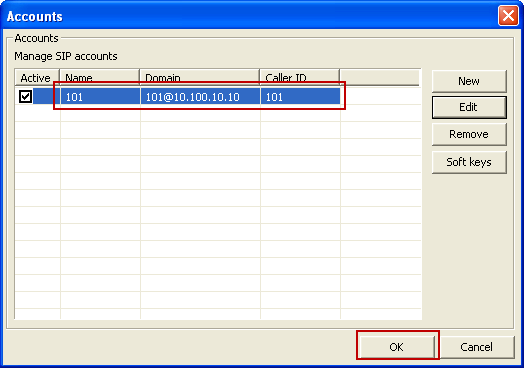
Connect Softphone 3CXPhone to the 101 number we made above, settings:
Number: 101
Password: ch72passwd
IP server: 10.100.10.10
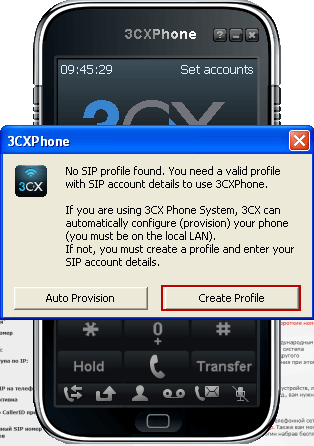
Create a new account in 3CXPhone:

If you are not using a standard port, for example. 5171We specify the IP server with the port: 10.100.10.10:5171

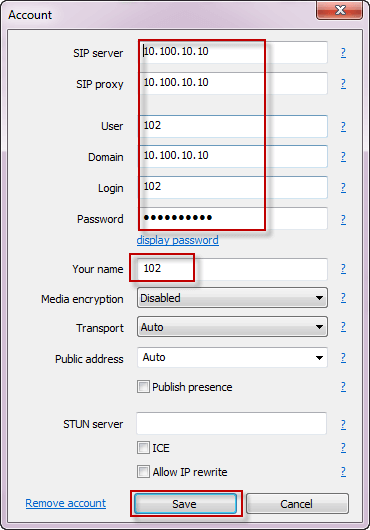
Connect Softphone. MikroSIPconnection parameters:
Number: 102
Password: cbTwpasswd
IP server: 10.100.10.10
Add an account when you first activate:
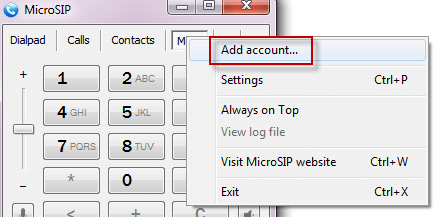
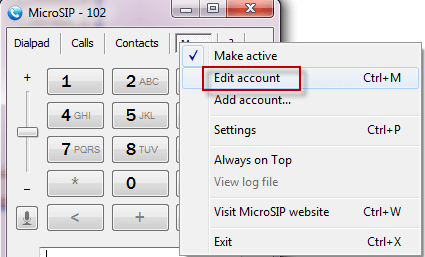
If you already have an account, we change the existing one or add a new one:
Enter the MikroSIP connection settings to Asterisk telephony if you are using a non-standard port, for example. 5171, specify the IP server with a port 10.100.10.10:5171
Connected softphone MikroSIP to our PBX:

Connected both the softphone and provider to our telephone PBX:

Now you can make calls from 101 to 102 and vice versa. To make a call from a smartphone with the number connected to Zadarma to the internal sip of the Zadarma provider, in my case it is from 08360 to 08364 and vice versa, we will make a test call on 4444 and to check the balance on 1111.
The basic setup of Asterisk telephony is carried out, you can use it.
I was with you. Sergey Lazarenko.
The same instructions recorded on the video, if you can not, you can watch the Asterisk setting in the video:

comment