


After installing Drupal 7 and opening pages /admin/reports/status - Status reportHere's the text:
Прогресс загрузки Выключено
Ваш сервер может отображать процесс закачки файлов с использованием APC, но это отключено. Добавьте строчку apc.rfc1867 = 1 в ваш php.ini. Вместо этого, рекомендуется использовать библиотеку PECL uploadprogress, которая поддерживает одновременную закачку более чем одного файла.

This means that on our Debian GNU/Linux Squeeze server or Ubuntu LTS Server for the PHP5 programming language, you need to install uploadprogress. We'll set it up for that. PECLand also install uploadprogress.
Method of installing pecl and installation uploadprogress №1
Install the necessary packages by the team:
aptitude install dh-make-php php5-dev
pecl install uploadprogress
System response at the end of installation:
Build process completed successfully
Installing '/usr/lib/php5/20090626+lfs/uploadprogress.so'
install ok: channel://pecl.php.net/uploadprogress-1.0.3.1
configuration option "php_ini" is not set to php.ini location
You should add "extension=uploadprogress.so" to php.ini
Add the established uploadprogress (c) the php5 configuration file command:
echo 'extension=uploadprogress.so' > /etc/php5/conf.d/uploadprogress.ini
Reboot the Apache2 web server with a command:
/etc/init.d/apache2 restart
Method of installing pecl and installation uploadprogress №2
If you are unable to install the package. uploadprogress (or other than that) can be gathered together. deb package uploadprogress:
Install the necessary software:
aptitude install dh-make-php php5-dev build-essential libmagic-dev
We execute 2 commands by substituting your data instead of Your Name and [email protected]:
export DEBFULLNAME="Your Name"
export DEBEMAIL="[email protected]"
Go to the folder where we will collect a package of source code with the command:
pecl download uploadprogress
System response:
downloading uploadprogress-1.0.3.1.tgz ...
Starting to download uploadprogress-1.0.3.1.tgz (9,040 bytes)
.....done: 9,040 bytes
File /usr/src/uploadprogress-1.0.3.1.tgz downloaded
Unpack the downloaded file with the command:
dh-make-pecl --only 5 uploadprogress-*.tgz
Go to the unpacked folder with the team:
cd php-uploadprogress-*/
And assemble the package with a team:
./debian/rules binary
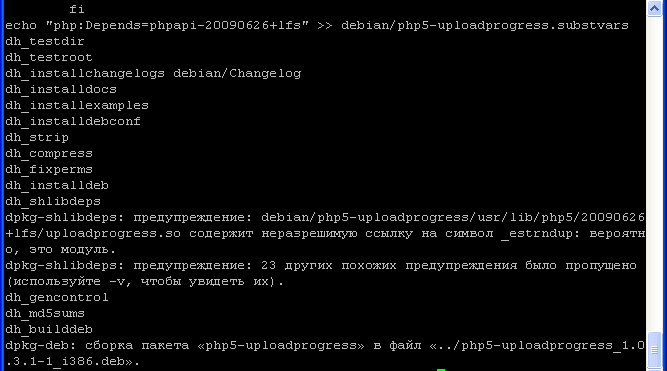
After a short build, depending on the power of the processor, we get the system's response to the end of the process:
dpkg-shlibdeps: предупреждение: debian/php5-uploadprogress/usr/lib/php5/20090626+lfs/uploadprogress.so содержит неразрешимую ссылку на символ _estrndup: вероятно, это модуль.
dpkg-shlibdeps: предупреждение: 23 других похожих предупреждения было пропущено (используйте -v, чтобы увидеть их).
dh_gencontrol
dh_md5sums
dh_builddeb
dpkg-deb: сборка пакета «php5-uploadprogress» в файл «../php5-uploadprogress_1.0.3.1-1_i386.deb».
Install the collected file by the command:
dpkg -i ../php5-uploadprogress*.deb
Add the established uploadprogress In the php5 configuration file - /etc/php5/conf.d/uploadprogress.ini team:
echo 'extension=uploadprogress.so' > /etc/php5/conf.d/uploadprogress.ini
Reboot the Apache2 web server with a command:
/etc/init.d/apache2 restart
The task is completed, Debian GNU/Linux Squeeze or Ubuntu LTS Server for php5 has pecl installed and uploadprogress installed.
When viewing in Drupal 7 on the page /admin/reports/status - Status reportHere's the text:
Прогресс загрузки Включено (PECL uploadprogress)

P.S.
In the same way, you can install other add-ons for php5, such as installing it. fileinfo
I was with you. Sergey Lazarenko.
Let’s take a short break and watch the video:

comment