
In the previous instructions: Asus RT-N66U WIFI router firmware from Merlin We ran the router. Today we will install Entware repository on this router.
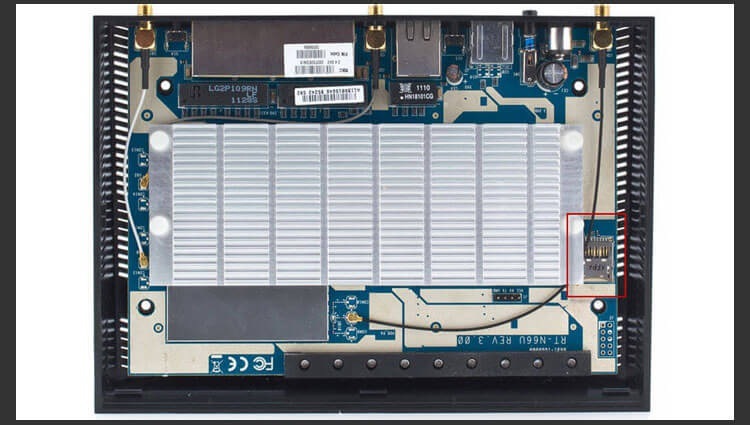
Before installing the repository on the Asus RT-N66U router, you need to connect a flash drive, and in order not to use 2 USB ports, you bought an 8GB microSD card, removed the router cover and put the flash drive into the microyousb nest and turn on the router.
The lid is removed very inconveniently, I did not manage to open perfectly so that there were no small dents under the lid. If the router is warranty, putting the cover on can take away your warranty.
Check how the flash drive sees the router system by executing the command fdisk -l:
fdisk -l

Disk /dev/sda: 7948 MB, 7948206080 bytes
245 heads, 62 sectors/track, 1021 cylinders
Units = cylinders of 15190 * 512 = 7777280 bytes

   Device Boot      Start         End      Blocks  Id System
/dev/sda1               1        1021     7754464  83 Linux
My flash drive is seen in the system as /dev/sda1
In your case, the flash drive can be in the FAT32 file system, I formatted the flash drive into the ext3 file system by following the command:
mkfs.ext3 /dev/sda1
Attention!!To install Entware on the router, you need Internet through a WAN port.
Entware in the firmware from Merlin is installed very simply by one command:
entware-setup.sh
system response:
entware-setup.sh
 Info:  This script will guide you through the Entware installation.
 Info:  Script modifies only "entware" folder on the chosen drive,
 Info:  no other data will be touched. Existing installation will be
 Info:  replaced with this one. Also some start scripts will be installed,
 Info:  the old ones will be saved to .entwarejffs_scripts_backup.tgz

 Info:  Looking for available partitions...
[1] --> /tmp/mnt/sda1
 =>  Please enter partition number or 0 to exit
[0-1]: 1
To request the system, you need to dial the number 1 and press Enter will start installing the Entware repository. To interrupt, dial 0 and press Enter.
All necessary programs will be downloaded and configured.
After installing Entware, update the repository and install a file manager. mc And then I did two commands:
Update:
opkg update
system response:
Downloading http://entware.wl500g.info/binaries/entware/Packages.gz.
Updated list of available packages in /opt/var/opkg-lists/openwrt.
opkg install mc
The file manager mc will be downloaded and installed, to run it we will execute the command:
mc -a
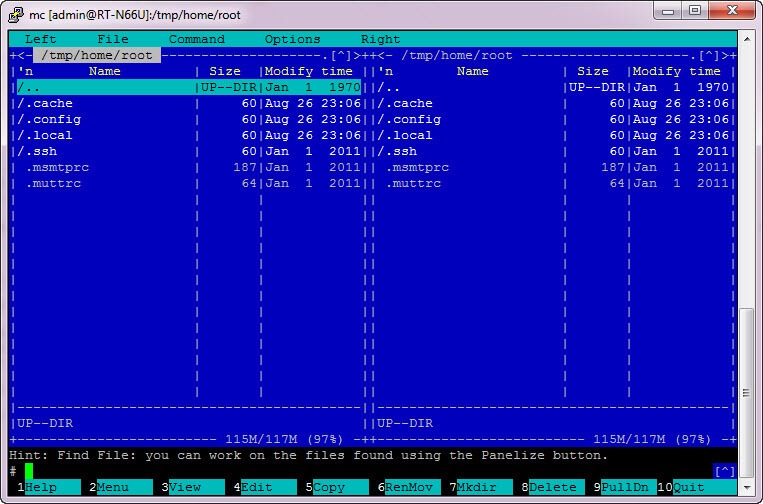
We installed the Entware repository, now you can install the programs you need on the router and make an almost full-fledged server from the router.
Sergei Lazarenko was with you.
Take a break and watch the video on setting up IP PBX 3CX Phone System:

comment