

Simple instructions for enabling rc.local service that starts after booting the operating system in Debian 9 Stretch
Create a file. /etc/rc.local And we make it executable by executing commands:
touch /etc/rc.local
chmod +x /etc/rc.local
Fill in the file:
vi /etc/rc.local
Contents:
#!/bin/sh -e
#
# rc.local
#
# This script is executed at the end of each multiuser runlevel.
# Make sure that the script will "exit 0" on success or any other
# value on error.
#
# In order to enable or disable this script just change the execution
# bits.
#
# By default this script does nothing.

exit 0
Create a file with the content:
vi /etc/systemd/system/rc-local.service
Contents:
[Unit]
 Description=/etc/rc.local Compatibility
 ConditionPathExists=/etc/rc.local

[Service]
 Type=forking
 ExecStart=/etc/rc.local start
 TimeoutSec=0
 StandardOutput=tty
 RemainAfterExit=yes
 SysVStartPriority=99

[Install]
 WantedBy=multi-user.target
Turn on the rc-local service by executing the command:
systemctl enable rc-local
Start the rc-local service by following the command:
systemctl start rc-local.service
Check the status of the service, launched or not run the command:
systemctl status rc-local.service
System response:
● rc-local.service - /etc/rc.local Compatibility
   Loaded: loaded (/etc/systemd/system/rc-local.service; enabled; vendor preset:
  Drop-In: /lib/systemd/system/rc-local.service.d
           └─debian.conf
   Active: active (exited) since Tue 2017-07-25 11:10:09 EEST; 7s ago
  Process: 1148 ExecStart=/etc/rc.local start (code=exited, status=0/SUCCESS)

Июл 25 11:10:09 webserver systemd[1]: Starting /etc/rc.local Compatibility...
Июл 25 11:10:09 webserver systemd[1]: Started /etc/rc.local Compatibility.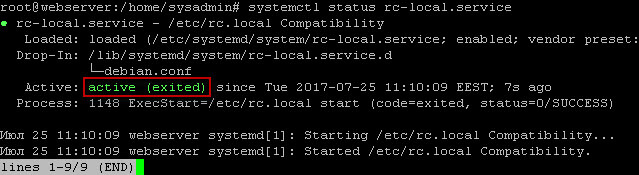
Installed rc.local, you can put your running scripts after booting the system.
I was with you. Sergey Lazarenko.
Let’s take a short break and look at one of the ways to divorce for money online:
Рейтинг статьи:

comment