


Wir beginnen uns vorzubereiten und zu installieren.
Installieren Sie die notwendige Software zum Erstellen von Versionen PHP 5.2, PHP 5.3, PHP 5.5 und PHP 5.6 Und dann habe ich den Befehl erteilt.
Mysql:
aptitude install php5-dev libxml2-dev libmhash-dev libcurl4-openssl-dev libbz2-dev libmagickwand-dev libpng12-dev libfreetype6-dev libgmp-dev libc-client2007e-dev libpspell-dev libsnmp-dev libtidy-dev libxslt1-dev make build-essential libmcrypt-dev libmysqld-dev libmagic-dev unzip libpq-dev

Mariadb:
aptitude install php5-dev libxml2-dev libmhash-dev libcurl4-openssl-dev libbz2-dev libmagickwand-dev libpng12-dev libfreetype6-dev libgmp-dev libc-client2007e-dev libpspell-dev libsnmp-dev libtidy-dev libxslt1-dev make build-essential libmcrypt-dev libmariadbd-dev libmagic-dev unzip libpq-dev
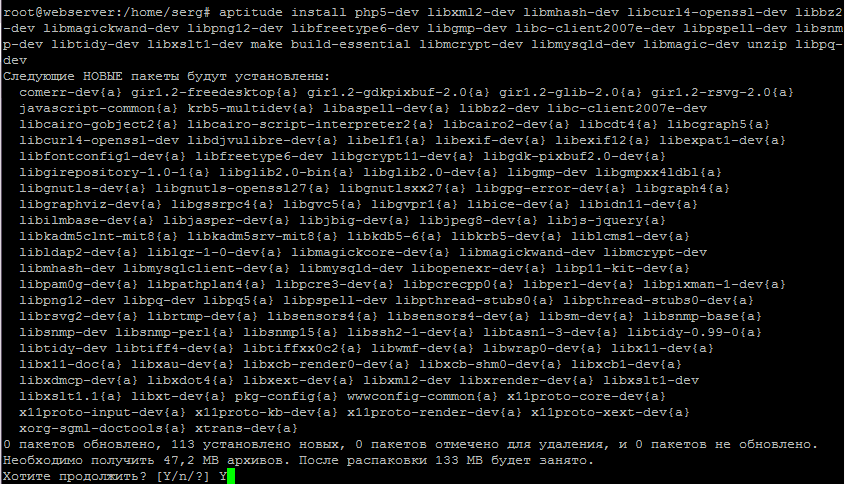
für die i386 Architektur:
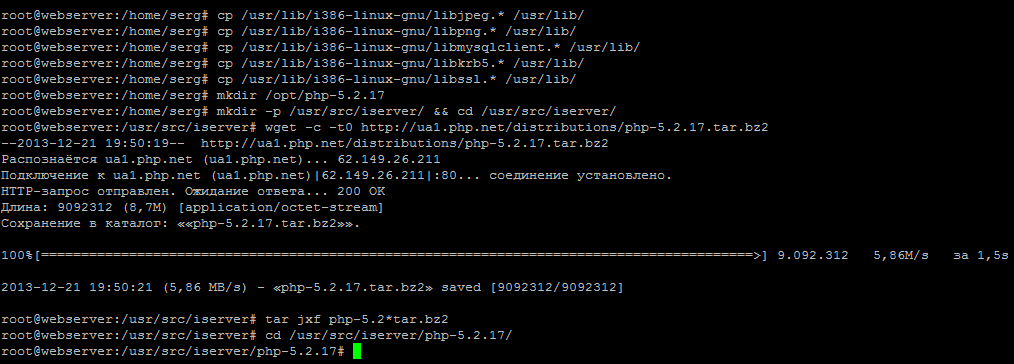
cp /usr/lib/i386-linux-gnu/libjpeg.* /usr/lib/
cp /usr/lib/i386-linux-gnu/libpng.* /usr/lib/
cp /usr/lib/i386-linux-gnu/libmysqlclient.* /usr/lib/
cp /usr/lib/i386-linux-gnu/libkrb5.* /usr/lib/
cp /usr/lib/i386-linux-gnu/libssl.* /usr/lib/
cp /usr/lib/x86_64-linux-gnu/libjpeg.* /usr/lib/
cp /usr/lib/x86_64-linux-gnu/libpng.* /usr/lib/
cp /usr/lib/x86_64-linux-gnu/libmysqlclient.* /usr/lib/
cp /usr/lib/x86_64-linux-gnu/libkrb5.* /usr/lib/
cp /usr/lib/x86_64-linux-gnu/libssl.* /usr/lib/
PHP Version 5.2.17 installieren
mkdir /opt/php-5.2.17
mkdir -p /usr/src/iserver/ && cd /usr/src/iserver/
wget -c -t0 http://softnastroy.com/downloads/php5/php-5.2.17.tar.bz2
tar jxf php-5.2*tar.bz2
cd /usr/src/iserver/php-5.2.17/
Laden Sie Sicherheitspatches herunter und überlagern Sie sie in den Quellcode von php 5.2.17, indem Sie die folgenden Befehle ausführen:
wget http://softnastroy.com/downloads/php5/php52-backports-20130717.patch
patch -p1 < php52-backports-20130717.patch
#
wget http://softnastroy.com/downloads/php5/debian_patches_disable_SSLv2_for_openssl_1_0_0.patch.patch.txt
patch -p1 < debian_patches_disable_SSLv2_for_openssl_1_0_0.patch.patch.txt
./configure \
--prefix=/opt/php-5.2.17 \
--with-config-file-path=/opt/php-5.2.17 \
--with-pdo-pgsql \
--with-zlib-dir \
--with-freetype-dir \
--enable-mbstring \
--with-libxml-dir=/usr \
--enable-soap \
--enable-calendar \
--with-curl=/usr/bin \
--with-mcrypt \
--with-zlib \
--with-gd \
--with-pgsql \
--disable-rpath \
--enable-inline-optimization \
--with-bz2 \
--with-zlib \
--enable-sockets \
--enable-sysvsem \
--enable-sysvshm \
--enable-pcntl \
--enable-mbregex \
--with-mhash \
--enable-zip \
--with-pcre-regex \
--with-mysql \
--with-mysql-sock=/var/run/mysqld/mysqld.sock \
--with-pdo-mysql \
--with-mysqli \
--with-jpeg-dir=/usr/lib/i386-linux-gnu \
--with-png-dir=/usr \
--enable-gd-native-ttf \
--with-openssl \
--enable-ftp \
--with-imap \
--with-imap-ssl \
--with-kerberos \
--with-gettext \
--enable-cli \
--enable-fastcgi \
--enable-discard-path \
--enable-force-cgi-redirect \
--enable-cgi \
--enable-bcmath
./configure \
--prefix=/opt/php-5.2.17 \
--with-config-file-path=/opt/php-5.2.17 \
--with-pdo-pgsql \
--with-zlib-dir \
--with-freetype-dir \
--enable-mbstring \
--with-libxml-dir=/usr \
--enable-soap \
--enable-calendar \
--with-curl=/usr/bin \
--with-mcrypt \
--with-zlib \
--with-gd \
--with-pgsql \
--disable-rpath \
--enable-inline-optimization \
--with-bz2 \
--with-zlib \
--enable-sockets \
--enable-sysvsem \
--enable-sysvshm \
--enable-pcntl \
--enable-mbregex \
--with-mhash \
--enable-zip \
--with-pcre-regex \
--with-mysql \
--with-mysql-sock=/var/run/mysqld/mysqld.sock \
--with-pdo-mysql \
--with-mysqli \
--with-jpeg-dir=/usr/lib/x86_64-linux-gnu \
--with-png-dir=/usr \
--enable-gd-native-ttf \
--with-openssl \
--enable-ftp \
--with-imap \
--with-imap-ssl \
--with-kerberos \
--with-gettext \
--enable-cli \
--enable-fastcgi \
--enable-discard-path \
--enable-force-cgi-redirect \
--enable-cgi \
--enable-bcmath
Für Debian 8 Jessie (Während es nicht funktioniert machen), werden wir zusätzlich mehrere Pakete installieren und einen Ordner und Simlink zur Bibliothek für eine erfolgreiche Build erstellen. PHP 5.2 auf Debian Jessie Und dann habe ich den Befehl erteilt.
aptitude install libkrb5-dev libmysqlclient15-dev
mkdir /usr/include/freetype2/freetype
ln -s /usr/include/freetype2/freetype.h /usr/include/freetype2/freetype/freetype.h
Führen Sie danach den Befehl zur Konfiguration von PHP 5.2 in Debian 8 Jessie mit der i386-Architektur aus:
./configure \
--prefix=/opt/php-5.2.17 \
--with-config-file-path=/opt/php-5.2.17 \
--with-pdo-pgsql \
--with-zlib-dir \
--with-freetype-dir \
--enable-mbstring \
--with-libxml-dir=/usr \
--enable-soap \
--enable-calendar \
--with-curl=/usr/bin \
--with-mcrypt \
--with-zlib \
--with-gd \
--with-pgsql \
--disable-rpath \
--enable-inline-optimization \
--with-bz2 \
--with-zlib \
--enable-sockets \
--enable-sysvsem \
--enable-sysvshm \
--enable-pcntl \
--enable-mbregex \
--with-mhash \
--enable-zip \
--with-pcre-regex \
--with-mysql \
--with-mysql-sock=/var/run/mysqld/mysqld.sock \
--with-pdo-mysql \
--with-mysqli \
--with-jpeg-dir=/usr/lib/i386-linux-gnu \
--with-png-dir=/usr \
--enable-gd-native-ttf \
--with-openssl \
--enable-ftp \
--with-imap \
--with-imap-ssl \
--with-kerberos \
--with-gettext \
--enable-cli \
--enable-fastcgi \
--enable-discard-path \
--enable-force-cgi-redirect \
--enable-cgi \
--enable-bcmath
./configure \
--prefix=/opt/php-5.2.17 \
--with-config-file-path=/opt/php-5.2.17 \
--with-pdo-pgsql \
--with-zlib-dir \
--with-freetype-dir \
--enable-mbstring \
--with-libxml-dir=/usr \
--enable-soap \
--enable-calendar \
--with-curl=/usr/bin \
--with-mcrypt \
--with-zlib \
--with-gd \
--with-pgsql \
--disable-rpath \
--enable-inline-optimization \
--with-bz2 \
--with-zlib \
--enable-sockets \
--enable-sysvsem \
--enable-sysvshm \
--enable-pcntl \
--enable-mbregex \
--with-mhash \
--enable-zip \
--with-pcre-regex \
--with-mysql \
--with-mysql-sock=/var/run/mysqld/mysqld.sock \
--with-pdo-mysql \
--with-mysqli \
--with-jpeg-dir=/usr/lib/x86_64-linux-gnu \
--with-png-dir=/usr \
--enable-gd-native-ttf \
--with-openssl \
--enable-ftp \
--with-imap \
--with-imap-ssl \
--with-kerberos \
--with-gettext \
--enable-cli \
--enable-fastcgi \
--enable-discard-path \
--enable-force-cgi-redirect \
--enable-cgi \
--enable-bcmath

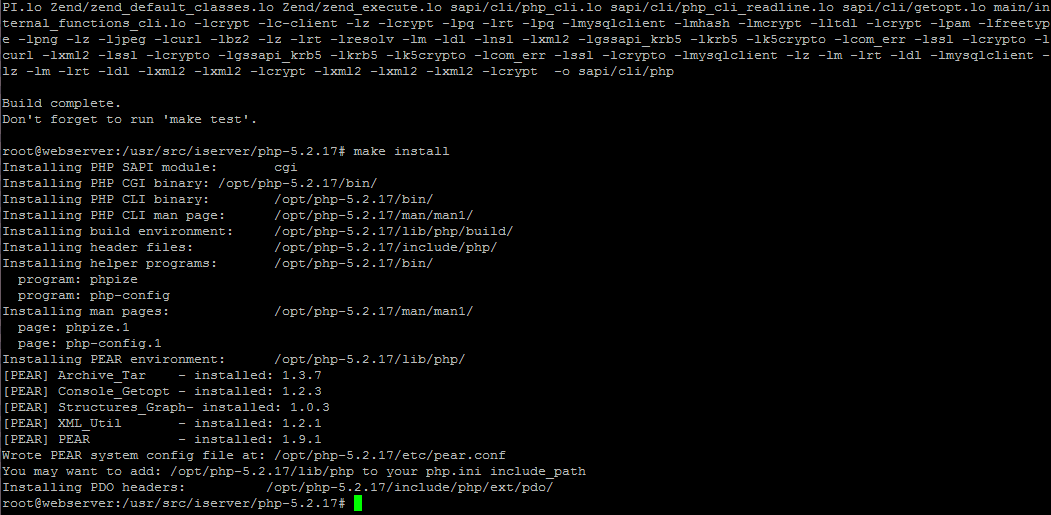
Sobald Sie konfiguriert sind, starten Sie mit der Zusammenstellung und Installation von PHP Version 5.2.17, indem Sie die Befehle ausführen:
make
make install
cp /usr/src/iserver/php-5.2.17/php.ini-recommended /opt/php-5.2.17/lib/php.ini
Überprüfen Sie die Version des installierten PHP Interpreters, indem Sie den Befehl ausführen:
/opt/php-5.2.17/bin/php -v
PHP 5.2.17 (cli) (built: Mar 20 2013 10:32:00)
Copyright (c) 1997-2010 The PHP Group
Zend Engine v2.2.0, Copyright (c) 1998-2010 Zend Technologies
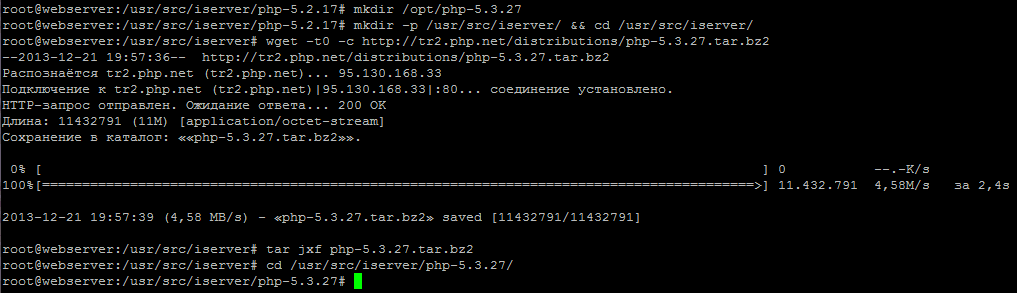
PHP Version 5.3 installieren
mkdir /opt/php-5.3.29
mkdir -p /usr/src/iserver/ && cd /usr/src/iserver/
wget -t0 -c http://ua2.php.net/distributions/php-5.3.29.tar.gz
tar xvf php-5.3.29.tar.gz
cd /usr/src/iserver/php-5.3.29/
./configure \
--prefix=/opt/php-5.3.29 \
--with-config-file-path=/opt/php-5.3.29 \
--with-pdo-pgsql \
--with-zlib-dir \
--with-freetype-dir \
--enable-mbstring \
--with-libxml-dir=/usr \
--enable-soap \
--enable-calendar \
--with-curl=/usr/bin \
--with-mcrypt \
--with-zlib \
--with-gd \
--with-pgsql \
--disable-rpath \
--enable-inline-optimization \
--with-bz2 \
--with-zlib \
--enable-sockets \
--enable-sysvsem \
--enable-sysvshm \
--enable-pcntl \
--enable-mbregex \
--with-mhash \
--enable-zip \
--with-pcre-regex \
--with-mysql \
--with-pdo-mysql \
--with-mysqli \
--with-jpeg-dir=/usr \
--with-png-dir=/usr \
--enable-gd-native-ttf \
--with-openssl \
--enable-ftp \
--with-imap \
--with-imap-ssl \
--with-kerberos \
--with-gettext \
--enable-cli \
--enable-cgi \
--enable-bcmath
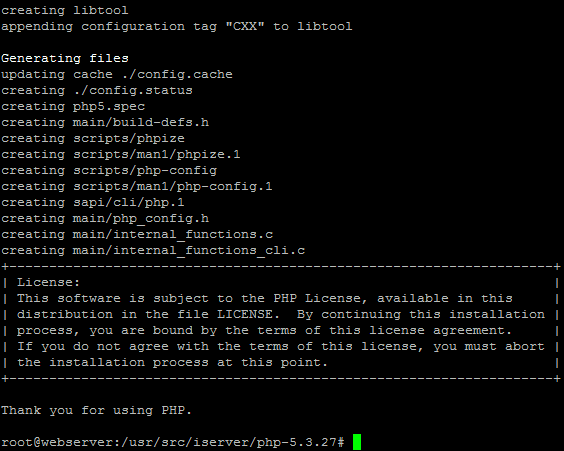
Nach der Konfiguration erstellen und installieren Sie PHP 5.3 für ISPConfig 3 in Debian Wheezy, indem Sie zwei Befehle ausführen:
make
make install
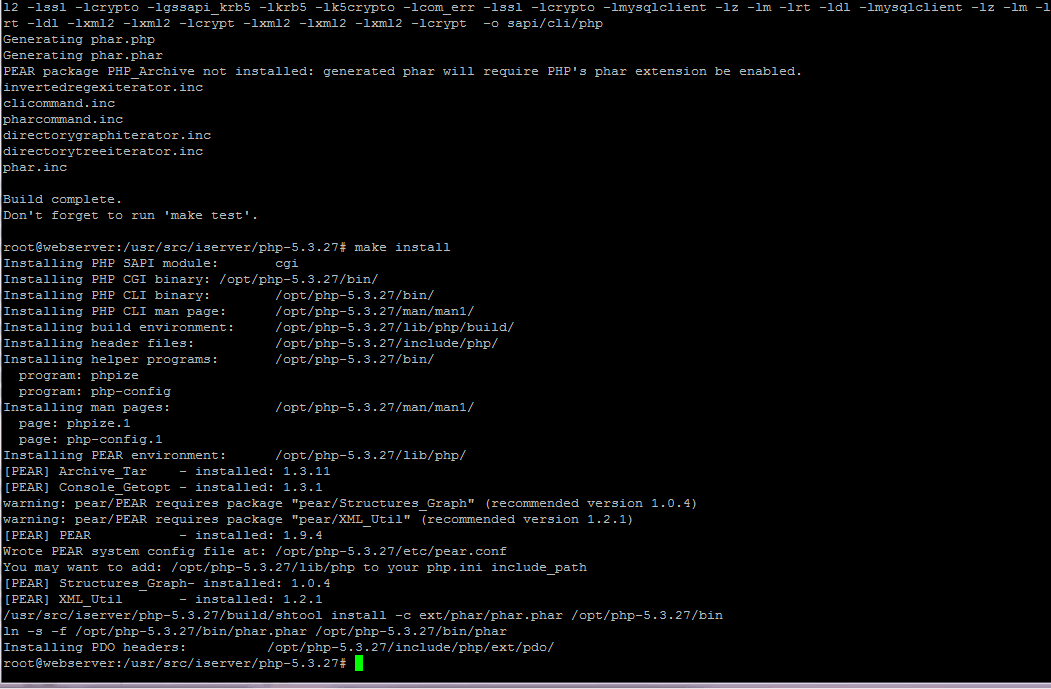
cp /usr/src/iserver/php-5.3.29/php.ini-production /opt/php-5.3.29/lib/php.ini
/opt/php-5.3.29/bin/php -v
PHP 5.3.29 (cli) (built: Sep 19 2013 10:21:28)
Copyright (c) 1997-2013 The PHP Group
Zend Engine v2.3.0, Copyright (c) 1998-2013 Zend Technologies
PHP Version 5.5 installieren
mkdir /opt/php-5.5.38
mkdir -p /usr/src/iserver/ && cd /usr/src/iserver/
wget -t0 -c http://ua2.php.net/distributions/php-5.5.38.tar.gz
tar xvf php-5.5.38.tar.gz
cd /usr/src/iserver/php-5.5.38/

Starten Sie die PHP 5.5.38 Sprachkonfiguration, indem Sie den Befehl ausführen, der für beide Versionen der Architekturen geeignet ist:
./configure \
--prefix=/opt/php-5.5.38 \
--with-config-file-path=/opt/php-5.5.38 \
--with-pdo-pgsql \
--with-zlib-dir \
--with-freetype-dir \
--enable-mbstring \
--with-libxml-dir=/usr \
--enable-soap \
--enable-calendar \
--with-curl=/usr/bin \
--with-mcrypt \
--with-zlib \
--with-gd \
--with-pgsql \
--disable-rpath \
--enable-inline-optimization \
--with-bz2 \
--with-zlib \
--enable-sockets \
--enable-sysvsem \
--enable-sysvshm \
--enable-pcntl \
--enable-mbregex \
--with-mhash \
--enable-zip \
--with-pcre-regex \
--with-mysql \
--with-pdo-mysql \
--with-mysqli \
--with-jpeg-dir=/usr \
--with-png-dir=/usr \
--enable-gd-native-ttf \
--with-openssl \
--enable-ftp \
--with-imap \
--with-imap-ssl \
--with-kerberos \
--with-gettext \
--enable-cli \
--enable-cgi \
--enable-bcmath
Nach der Konfiguration starten Sie mit der Zusammenstellung und Installation von PHP Version 5.5.38, indem Sie die Befehle ausführen:
make
make install
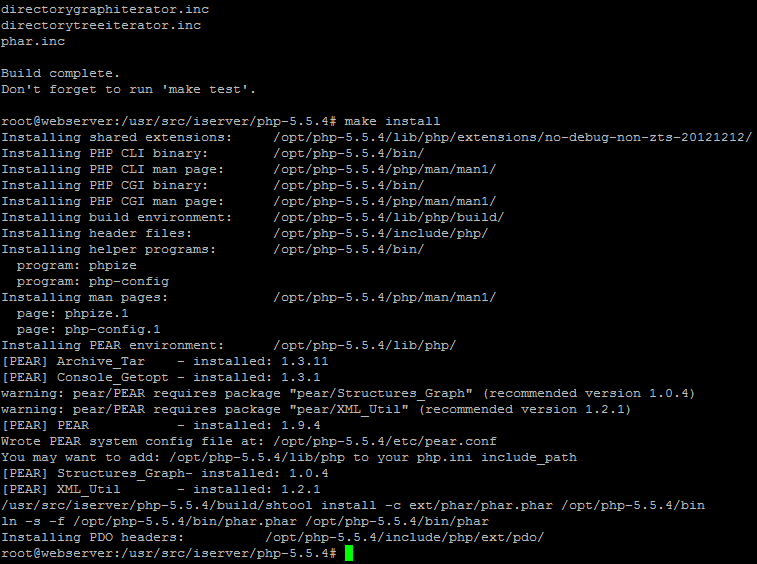
Erstellen einer Konfigurationsdatei php.iniDazu werden wir den Befehl ausführen:
cp /usr/src/iserver/php-5.5.38/php.ini-production /opt/php-5.5.38/lib/php.ini
/opt/php-5.5.38/bin/php -v
PHP 5.5.38 (cli) (built: Aug 17 2014 14:28:45)
Copyright (c) 1997-2014 The PHP Group
Zend Engine v2.5.0, Copyright (c) 1998-2014 Zend Technologies
PHP Version 5.6 installieren
mkdir /opt/php-5.6.30
mkdir -p /usr/src/iserver/ && cd /usr/src/iserver/
wget -t0 -c http://ua2.php.net/distributions/php-5.6.30.tar.gz
tar xvf php-5.6.30.tar.gz
cd /usr/src/iserver/php-5.6.30/
Starten Sie die PHP 5.6-Sprachkonfiguration, indem Sie den Befehl ausführen, der für beide Versionen der Architekturen geeignet ist:
./configure \
--prefix=/opt/php-5.6.30 \
--with-config-file-path=/opt/php-5.6.30 \
--with-pdo-pgsql \
--with-zlib-dir \
--with-freetype-dir \
--enable-mbstring \
--with-libxml-dir=/usr \
--enable-soap \
--enable-calendar \
--with-curl=/usr/bin \
--with-mcrypt \
--with-zlib \
--with-gd \
--with-pgsql \
--disable-rpath \
--enable-inline-optimization \
--with-bz2 \
--with-zlib \
--enable-sockets \
--enable-sysvsem \
--enable-sysvshm \
--enable-pcntl \
--enable-mbregex \
--with-mhash \
--enable-zip \
--with-pcre-regex \
--with-mysql \
--with-pdo-mysql \
--with-mysqli \
--with-jpeg-dir=/usr \
--with-png-dir=/usr \
--enable-gd-native-ttf \
--with-openssl \
--enable-ftp \
--with-imap \
--with-imap-ssl \
--with-kerberos \
--with-gettext \
--enable-cli \
--enable-cgi \
--enable-bcmath
Sobald Sie konfiguriert sind, starten Sie mit der Zusammenstellung und Installation von PHP Version 5.6, indem Sie die Befehle ausführen:
make
make install
Erstellen einer Konfigurationsdatei php.iniDazu werden wir den Befehl ausführen:
cp /usr/src/iserver/php-5.6.30/php.ini-production /opt/php-5.6.30/lib/php.ini
/opt/php-5.6.30/bin/php -v
Systemreaktion:
PHP 5.6.30 (cli) (built: Jun 14 2017 09:21:49)
Copyright (c) 1997-2016 The PHP Group
Zend Engine v2.6.0, Copyright (c) 1998-2016 Zend Technologies
Hinzufügen der etablierten Sprachen PHP 5.2, PHP 5.3, PHP 5.5 und PHP 5.6 zu ISPConfig 3
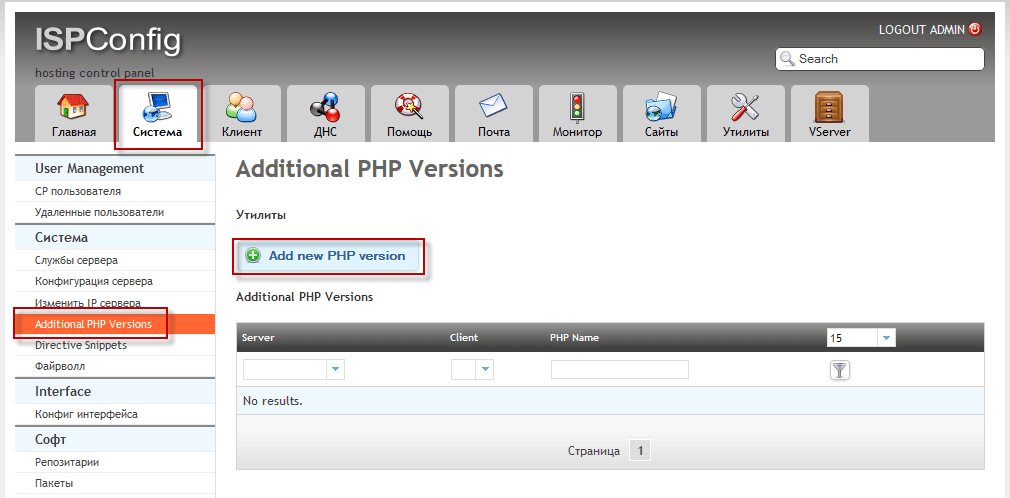
- Server: webserver.server.loc
- Client:
- PHP Name: php-5.2.17
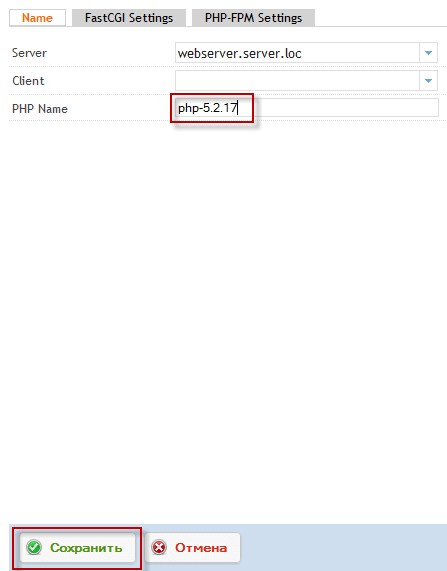
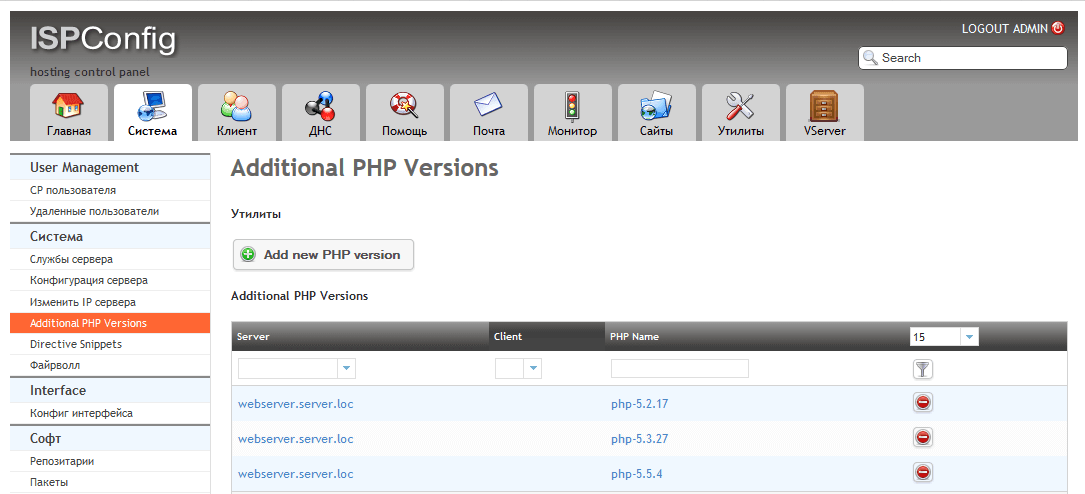
Der Rest der PHP-Sprache ist im obigen Beispiel enthalten.
Hinzufügen der PHP 5.3-Sprache zum Panel ISPConfig 3 bei Debian Wheezy
- Server: webserver.server.loc
- Client:
- PHP Name: php-5.3.29
Hinzufügen von PHP 5.5 zum ISPConfig 3-Panel in Debian Wheezy
- Server: webserver.server.loc
- Client:
- PHP Name: php-5.5.38
Hinzufügen von PHP 5.6 zum ISPConfig 3-Panel in Debian
- Server: webserver.server.loc
- Client:
- PHP Name: php-5.6.30
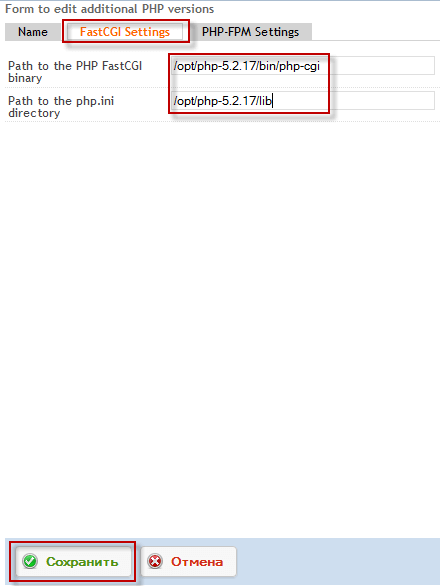
- Path to the PHP FastCGI binary: /opt/php-5.2.17/bin/php-cgi
- Path to the php.ini directory: /opt/php-5.2.17/lib
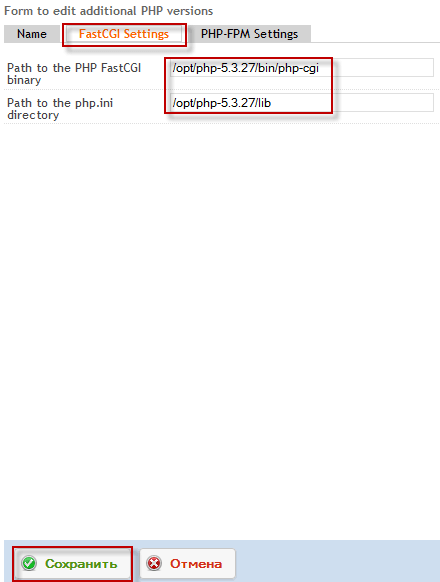
- Path to the PHP FastCGI binary: /opt/php-5.3.29/bin/php-cgi
- Path to the php.ini directory: /opt/php-5.3.29/lib
- Path to the PHP FastCGI binary: /opt/php-5.5.38/bin/php-cgi
- Path to the php.ini directory: /opt/php-5.5.38/lib
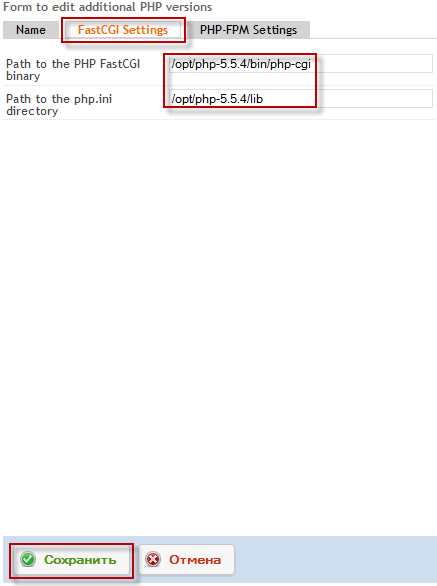
- Path to the PHP FastCGI binary: /opt/php-5.6.30/bin/php-cgi
- Path to the php.ini directory: /opt/php-5.6.30/lib
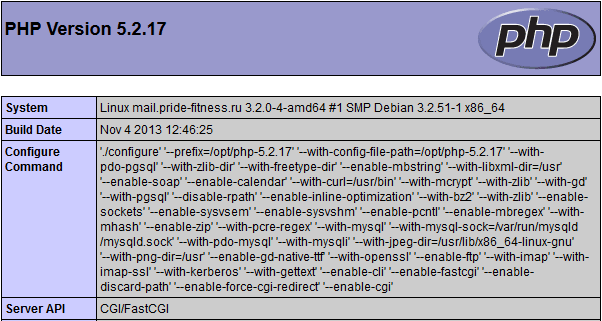
Überprüfen Sie die Funktionsfähigkeit der installierten PHP-Version der Sprache
echo '<?php phpinfo(); ?>' > /var/www/mail.server.loc/web/i.php
chmod 755 /var/www/mail.server.loc/web/i.php
http://mail.server.loc/i.php

http://mail.server.loc/i.php
http://mail.server.loc/i.php

http://mail.server.loc/i.php


Kommentar